
RBAC VS ABAC: Choosing the Right Authorization Policy Model
RBAC grants access by role; ABAC evaluates user, resource, and environment attributes. Compare them side by side, see examples, and learn how to migrate from RBAC to ABAC.

- Share:

Loading
3366 Members
 Join Permit's Slack
RBAC vs ABAC in one paragraph: role-based access control (RBAC) grants access based on the role assigned to a user, such as Admin or Editor. Attribute-based access control (ABAC) grants access by evaluating attributes of the user, the resource, and the environment, such as department, data classification, or time of day. RBAC is simpler to run. ABAC handles conditional rules without a new role for each one.
Choosing and properly implementing the right authorization model is not easy, but it is critical to maintaining the security and privacy of an application, its users, and its data. Below we review both models, compare them side by side, walk through examples, and cover how to migrate from RBAC to ABAC when roles stop being enough. If ReBAC is also on your list, see the three-way comparison, RBAC vs ABAC vs ReBAC.
| RBAC | ABAC | |
|---|---|---|
| Grants access based on | The role assigned to the user | Attributes of the user, resource, action, and environment |
| Typical rule | "Editors can edit documents" | "Employees based in the EU can edit GDPR-protected documents" |
| Best for | Stable job functions and coarse permissions | Conditions such as time, location, plan, clearance, or data classification |
| Breaks down when | Every new condition becomes another role (role explosion) | Attribute data is missing, stale, or scattered across systems |
| "Who can access X?" | Easy: list the role holders | Harder: you have to evaluate conditions |
| Data it needs | User to role assignments | Fresh attribute values at decision time |
| Deep dive | What is RBAC? | What is ABAC? |
Role-based access Control (RBAC) is an authorization model used to determine access control based on predefined roles. Access permissions are assigned to roles like “Admin” or “Editor.” Then, the administrator assigns roles to specific users.
This structure allows you to easily understand who has access to what based on these defined roles.
For example, here’s a rather simple example of an RBAC policy in simple English:
Employees can View and Edit Documents, while Admins can View, Edit, Create, and Delete them.
RBAC provides a rather simple solution for controlling access to resources based on a predefined set of roles that can, for example, correlate with an individual's job function or responsibilities.
So how is ABAC any different? Let’s dive into it.
Attribute Based Access Control (ABAC) is a Fine Grained Authorization method that’s all about conditional attributes. These allow for a much more fine-grained way of managing access control.
Attributes can contain a vast number of parameters, such as a user’s role, security clearance, time of access, location of the data, current organizational threat levels, resource creation date or ownership, data sensitivity, etc.
For example, here’s an example of an ABAC policy in simple English:
Employees who are based within the European Union can perform any action on a GDPR Protected Document.
The policy, as any authorization policy, can be divided into three parts:
Who can perform which Action on which Resource
In this example, the question ‘Who?’ can be answered by:
The same goes for the Resource:
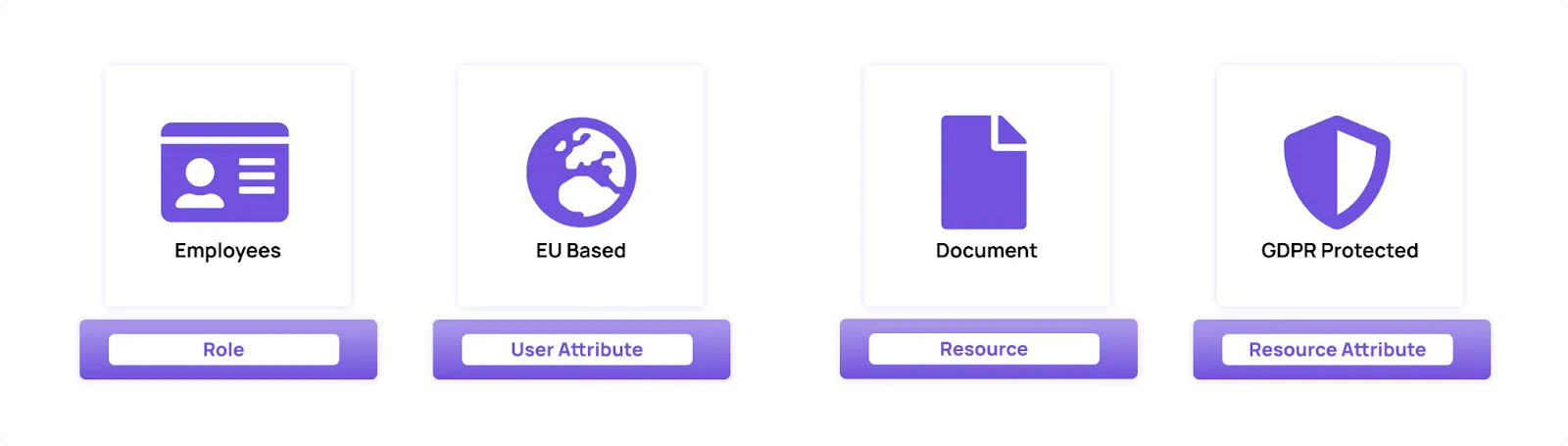
ABAC allows us to create highly granular, complex, and detailed authorization policies based on varying user and resource attributes.
Fine-grained: ABAC provides the ability to create extremely fine-grained access control policies with its use of attributes. This becomes an ever-growing requirement as policies for billing (e.g. "only users who paid for a feature can use it"), location, time, trust level, quotas, anomaly, fraud, and risk profiles are becoming basic requirements.
Highly Dynamic: Applications often rely on abilities that have to be managed in a real-time fashion. If implemented using the right tools, ABAC can provide dynamic access control based on real-time changes in user/resource attributes. Perfect examples of this are the need for attributes such as time, a user’s geolocation, payment status, etc.
Complexity: Implementing, managing, and maintaining ABAC can be a huge challenge. Not only can it be very complex and time-consuming to design, but it's also an ongoing endeavor. Authorization doesn’t stop at the point of implementation; it needs to be managed and adapted to the application's needs as it changes and grows. It is absolutely crucial to provide your developers and relevant stakeholders with an accessible way to manage and maintain their ABAC policies.
Resource-intensive: As ABAC potentially requires taking a very large number of attributes into account, it can be very resource-intensive, requiring more processing power and time.
Difficult to audit: ABAC can be difficult to audit because access control decisions are based on complex policies that may be difficult to understand. This challenge can be addressed by using an authorization service that allows easy access to audit logs for both RBAC and ABAC.
Now that we have reviewed both policy models, how would we know which one is more suitable for our needs?
In short, the choice between the two depends on the needs of your organization and the application you are building.
RBAC provides a rather simple solution for determining authorization: Only a person with the role of X can perform action Y on resource Z. This solution is simple and usually sufficient for most organizations. While keeping things rather simple, RBAC lacks flexibility as user access is defined solely by roles and not specific attributes. ABAC provides a more in-depth approach, allowing you to add attributes and create much more granular, dynamic access control. That being said, ABAC can require more processing power and implementation time, so it's important to strike a balance so your authorization policy is neither too simplistic nor too complex.
In many cases, RBAC and ABAC can be used together hierarchically, with broad access enforced by RBAC protocols and more complex access managed by ABAC. Organizations often start by implementing their own RBAC and then gradually evolve it into ABAC as additional attributes are required. When dynamic data points such as time, location, billing status, and current behavior come into effect, ABAC is unavoidable.
If implementing and maintaining authorization wasn’t complex enough, creating a structure that allows you to switch from one model to another or use them together can be even more daunting. An easy solution to this complexity is picking an authorization solution that adheres to authorization best practices and is flexible and accessible.
The same requirement often looks very different in each model. Here are a few side by side.
| Requirement | RBAC approach | ABAC approach |
|---|---|---|
| Editors can edit articles | Assign the editor role; the role grants edit on articles |
Works, but a role is the simpler tool here |
| Only EU-based employees can edit GDPR-protected documents | Create an eu-gdpr-editor role and keep its membership in sync by hand |
One rule: user.location == "EU" and resource.classification == "GDPR Protected" |
| Users can use a premium feature only if their plan includes it | A premium-user role that has to change every time billing changes |
One rule on the tenant or user plan attribute |
| Trades are allowed only while the relevant market is open | Not expressible without time-bound role assignments | One rule on the request time and the product's market hours |
| Users can invest above a limit only with sufficient history | A role per limit tier | One rule comparing the requested amount to a user attribute |
The pattern is consistent: RBAC is the cleanest answer when access follows a job function, and ABAC is the cleanest answer when access depends on data that changes independently of anyone's job.
Take a fintech application that lets users invest in stocks, bonds, and funds. It starts with a traditional RBAC setup: "basic user," "premium user," and "administrator." Then the product grows, and it needs to grant access based on things like:
Application-specific attributes pile up quickly too, such as portfolio diversity rules or investment experience requirements for higher-risk products. None of this maps cleanly to a fixed set of roles. Every attempt to express it in RBAC ends in more roles, more exceptions in application code, or both. ABAC expresses each of these as a rule over attributes.
Migrating a homegrown RBAC system to ABAC usually goes through the same steps:
Watch the data path. ABAC decisions need attribute data at decision time, and the application's default database schema is often not shaped for that kind of query. Plan how attributes reach the decision point (and how they stay fresh) before you switch enforcement over, or performance becomes the migration's biggest problem.
With Permit, the RBAC to ABAC step is incremental: you keep your roles, define user and resource attributes, and build ABAC rules (user sets and resource sets) on the same policy.
Authorization requirements tend to grow exponentially along with the application. The requirement to shift from hardcoded Admin / Not admin rules into RBAC and ABAC can happen extremely fast. As various requirements from customers, security, compliance, and 3rd party integrations come in, a homegrown authorization layer often needs repeated refactoring.
Setting up a system as complex as ABAC could take months of work, and the work doesn’t end at the point of implementation. Creating additional roles, attributes, and policies requires complex R&D work and steep learning curves.
This creates a situation where developers become bottlenecks in your app’s permission management, other stakeholders are locked out of the conversation, and your customers are left without the flexibility they require.
The solution is to implement and manage your RBAC and ABAC policies using an authorization service that allows for flexible transition between authorization models and provides a simple, no-code UI that makes permission management accessible to other stakeholders. That’s where Permit comes in.
Permit.io provides developers with a permission management solution that allows for both smooth transitioning from RBAC to ABAC and the ability to create and manage policies using an accessible no-code UI.
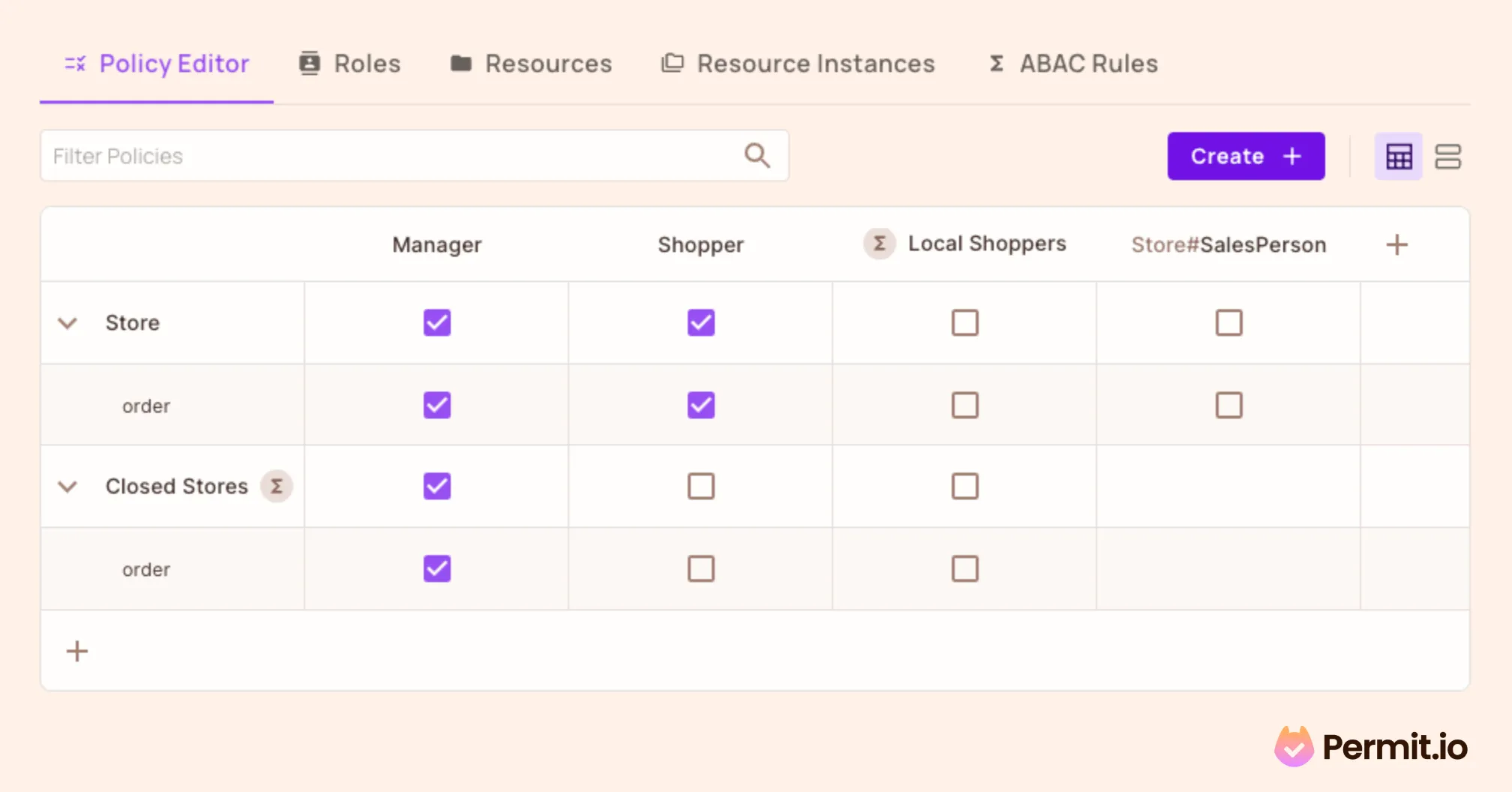
Setting up an ABAC policy with Permit's UI is as easy as checking a box
Permit’s UI generates policy as code, wrapping it nicely into Git and API / UI interfaces, which you can edit, add to, and manage however you like.
This allows developers and other stakeholders to set up RBAC policies and add complex attributes and conditions without writing a single line of code.
Implementing authorization with Permit.io ensures that everyone is included in the permission management process. This prevents developers from becoming bottlenecks and allows a smooth transition between RBAC and ABAC.
Want to learn more about Authorization? Join our Slack community, where developers discuss building and implementing authorization.

Application authorization enthusiast with years of experience as a customer engineer, technical writing, and open-source community advocacy. Comunity Manager, Dev. Convention Extrovert and Meme Enthusiast.