Attribute-Based Access Control (ABAC) is an authorization model that evaluates attributes of users, resources, actions, and environmental context to make access decisions. Unlike role-based models that assign static permissions through roles, ABAC uses policies that combine multiple attributes, enabling fine-grained, context-aware authorization without managing thousands of roles.
For example, an ABAC policy might grant access when user.department == "finance" and resource.classification == "internal" and request.time falls within business hours. Each condition is an attribute, and the decision engine evaluates them together.
ABAC complements Role-Based Access Control (RBAC), which works well for stable job-function permissions, and Relationship-Based Access Control (ReBAC), which handles hierarchies and ownership. When your access decisions depend on dynamic context such as time, location, clearance level, or resource sensitivity, ABAC is usually the right fit. For help choosing between them, see the RBAC vs ABAC vs ReBAC comparison.
The Components of ABAC
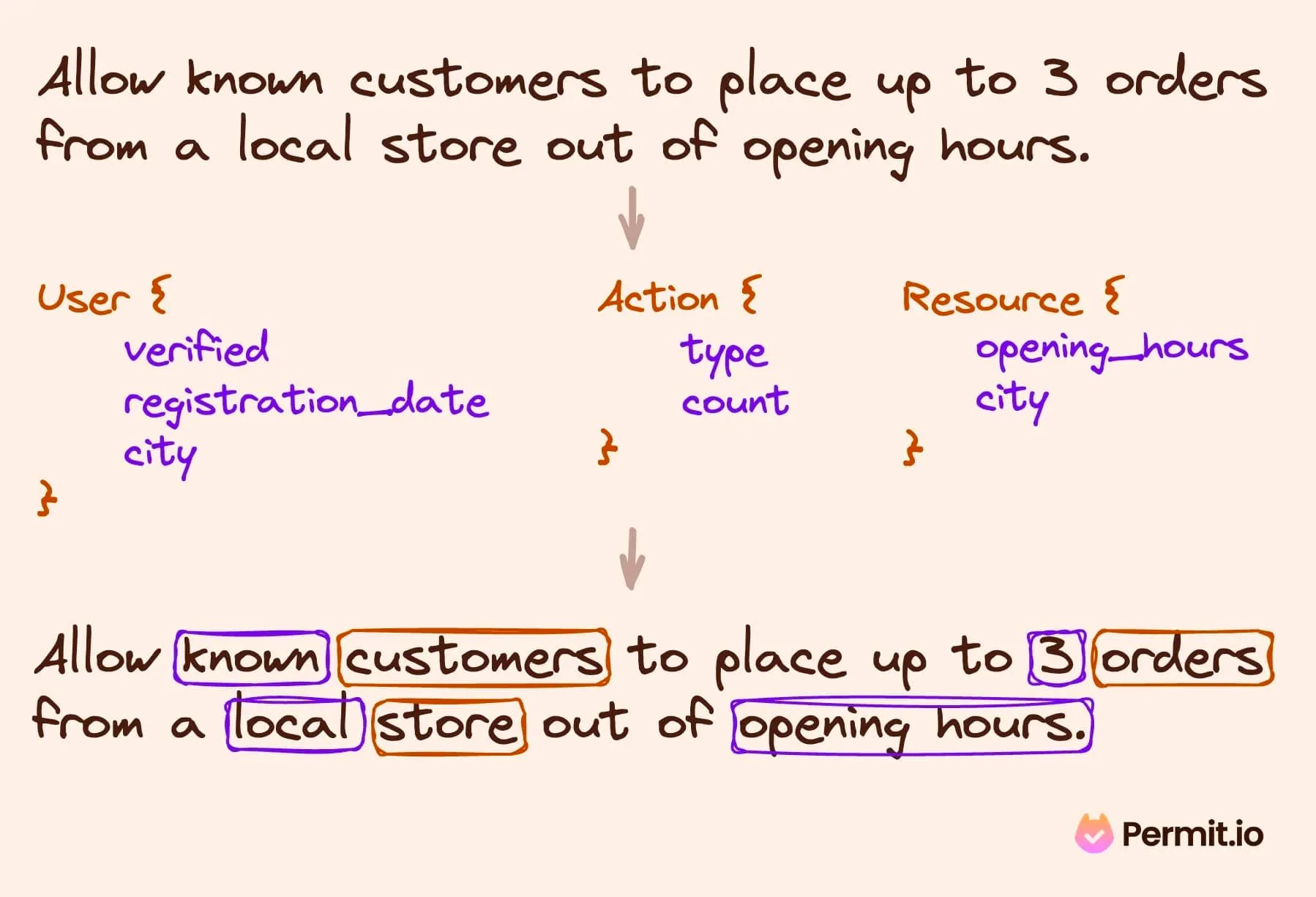
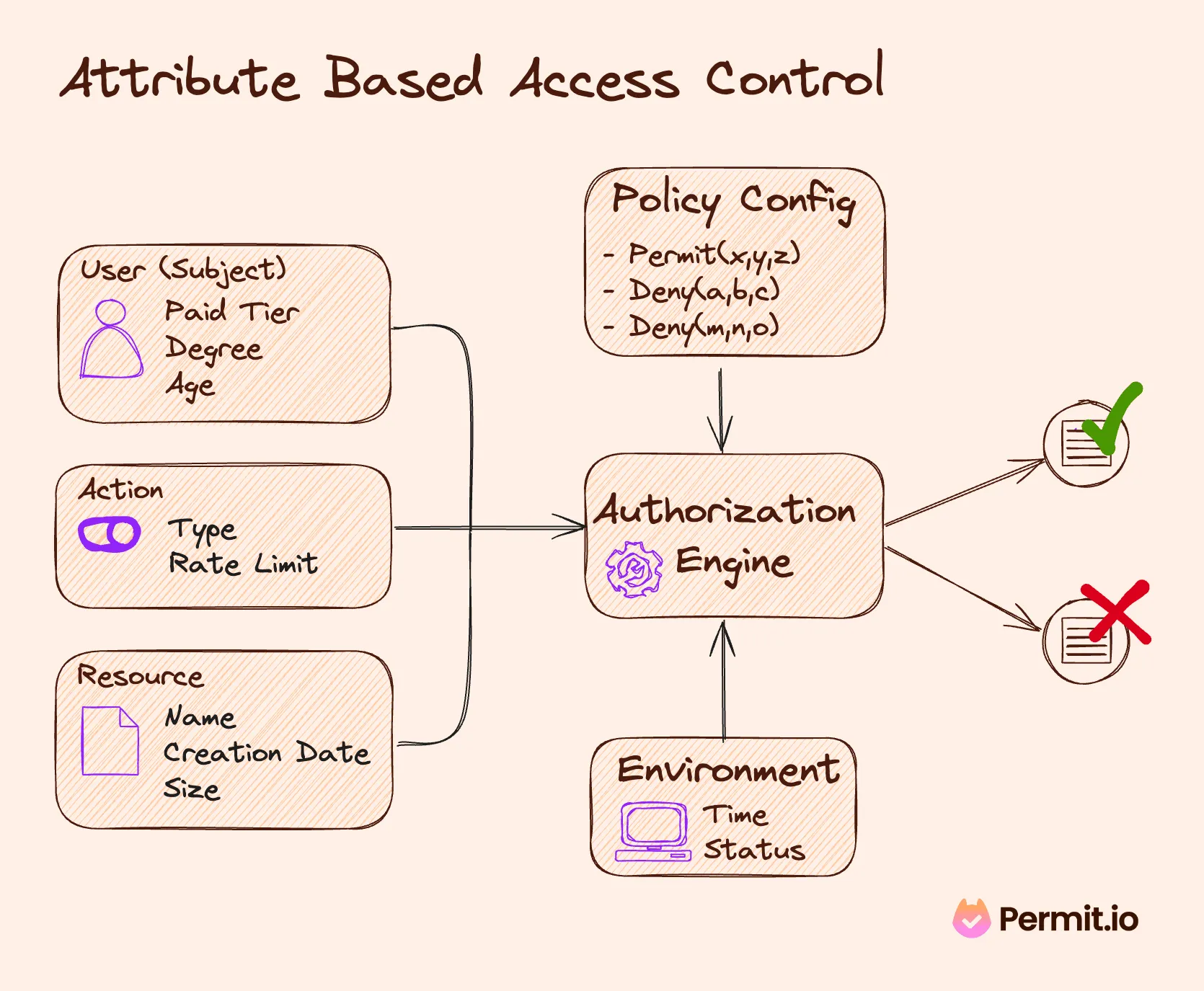
An ABAC policy is crafted using a combination of subject, resource, action, and attributes. By considering these four elements, an ABAC policy can reach the Boolean decision of access granted/denied.
There are four types of attributes that the ABAC model utilizes to craft access policies. An ABAC policy can use one or all of them together, depending on the context and the policy requirements:
- Subject Attributes: These encompass user-related characteristics, including roles, departments, and security clearances. They form the backbone of the user identity within the ABAC framework, providing a detailed profile that guides access decisions.
- Resource Attributes: These relate to the assets or objects (files, applications, APIs) being accessed. Attributes like file type, sensitivity level, and ownership are crucial in defining the nature of the resource in the access control equation.
- Action Attributes: These define the nature of a user's interaction with a resource.
Actions usually describe the type of action performed (Like read, write, edit, or delete) and can be paired with action attributes, such as “frequency” (For example - a limit on how many times an action can be performed).
- Environmental Attributes: These capture the broader context of the access request, including time, location, and device used. This dimension adds a dynamic aspect to ABAC, allowing policies to adapt to changing contexts.
The ABAC framework integrates these components to create a rich, multi-dimensional approach to access control, enabling precise and adaptable policies for varying scenarios.
Benefits of ABAC
ABAC offers several compelling advantages:
- Granularity: ABAC enables highly precise policy-making by considering a wide range of factors when making a decision. This granularity extends way beyond basic role-based controls, allowing for specific, context-driven access decisions.
- Flexibility: Policies in ABAC can be dynamically adjusted to changing organizational needs. Consider a multinational corporation that needs to adjust access rights based on varying data protection laws in different countries. ABAC policies can be quickly adapted to comply with these legal variations without completely overhauling the access control system.
- Scalability: ABAC efficiently manages increasing volumes of users and resources. In a rapidly growing tech company, for instance, as new employees join and new projects are initiated, ABAC can seamlessly scale to accommodate these changes without needing constant policy reconfiguration.
- Enhanced Security and Compliance: ABAC's detailed access control significantly improves security. In a financial institution, ABAC can restrict access to sensitive financial records based on a combination of user role, location, and transaction context, thereby reducing the risk of data breaches and ensuring compliance with financial regulations.
- Reduced Administrative Overhead: ABAC minimizes manual intervention by automating access decisions based on attributes. In a university setting, for instance, access to academic records can be automatically adjusted based on a student’s enrollment status, course registration, and academic role, thus reducing the administrative burden on IT staff.
Each of these benefits illustrates how ABAC's nuanced approach to access control can be practically applied across various sectors, showcasing its versatility and effectiveness in addressing complex security challenges.
Limitations of ABAC
Adopting ABAC offers many benefits, but it's essential to be aware of its challenges:
- Complex Implementation: Establishing ABAC requires defining a broad set of attributes across users and resources. This complexity can be particularly challenging for smaller organizations with limited technical resources, as it demands a deep understanding of the operational and security dynamics. This complexity can be alleviated by using best practices such as decoupling policy and code.
- Intricate Policy Management: ABAC involves creating detailed, context-specific policies, which can be numerous and intricate. This complexity necessitates meticulous management to ensure policies remain relevant and effective as the organization's needs evolve. These policies can be managed by creating or adopting a policy management solution.
- Performance Overhead: ABAC's detailed attribute evaluation process can impact system performance. In scenarios requiring rapid access decisions or in large-scale deployments, the resource intensity of processing multiple attributes and complex policies can lead to latency issues.
- Risk of Policy Conflicts: Given the granular nature of ABAC policies, there's a potential for conflicting rules, especially when numerous attributes and conditions are involved. Resolving these conflicts requires careful policy design and regular reviews to maintain consistency and clarity in access control decisions.
- Data synchronization: Applications often rely on data sources (Internal or external) to aid in the decision-making process (Think of limiting access based on payment status - information that is contained and managed in Stripe). Getting all the relevant attribute data into your decision point in time can pose quite a challenge (Though tools like OPAL can alleviate it).
Effectively addressing these challenges is crucial for organizations to harness the full potential of ABAC, ensuring an efficient, flexible access control system.
ABAC and Other Policy Models
ABAC's approach to access control is distinct from other models like RBAC (Role-Based Access Control), ReBAC (Relationship-Based Access Control), and PBAC (Policy-Based Access Control).
RBAC assigns permissions to roles and users inherit those permissions by holding a role. ABAC evaluates attributes at decision time, which lets you express rules such as "managers can approve expenses under $10,000 during business hours" without creating a role for every combination of amount and time.
|
RBAC |
ABAC |
| Grants access based on |
Static role assignments |
Attributes of user, resource, action, and environment |
| Best for |
Stable job functions, coarse boundaries |
Dynamic conditions: time, location, data classification, quotas |
| Granularity |
Limited by the number of roles you are willing to manage |
High: policies can test any attribute available at decision time |
| Breaks down when |
Role explosion from per-context or per-resource roles |
Attribute data is stale or missing at the decision point |
| Auditability |
Easy: list role holders |
Harder: you need the attribute values used in each decision |
| Implementation complexity |
Lower |
Higher |
For most applications, the practical path is to start with RBAC for broad boundaries and layer ABAC rules on top when dynamic conditions start to matter.
ReBAC (Relationship-Based Access Control) adds another dimension to access control by considering relationships between entities. For example, in a social networking platform, access control might depend on the nature of the user relationships (like friends or followers). While versatile in evaluating multiple attributes, ABAC doesn't inherently account for these relational dynamics.
ABAC vs. PBAC
ABAC is often seen as a specialized form of [**PBAC (Policy-Based Access Control)**](https://www.permit.io/blog/what-is-rbac#:~:text=Policy-Based Access Control (PBAC) "https://www.permit.io/blog/what-is-rbac#:~:text=Policy-Based Access Control (PBAC)"), focusing on leveraging a wide range of attributes for access decisions. PBAC encompasses broader policy-based controls, but ABAC differentiates itself with its fine-grained, attribute-centric approach.
Each model has its strengths, and the choice depends on your application's specific requirements and the organizational context.
package abac

# User attributes
user_attributes := {
    "User1": {"location": "EU", "title": "employee"},
    "User2": {"location": "US", "title": "employee"},
    "User3": {"location": "EU", "title": "manager"}
}
# Document attributes
document_attributes := {
    "Doc1": {"classification": "GDPR Protected"},
    "Doc2": {"classification": "Non-sensitive"}
}
# Default deny
default allow = false
# EU employees can perform any action on GDPR Protected Document
allow {
    # Lookup the user's attributes
    user := user_attributes[input.user]
    # Check that the user is an employee
    user.title == "employee"
    # Check that the employee is based in the EU
    user.location == "EU"
    # Check that the document is GDPR Protected
    document_attributes[input.document].classification == "GDPR Protected"
}
# Allow any employee to access non-GDPR-protected documents
allow {
    # Lookup the user's attributes
    user := user_attributes[input.user]
    # Check that the user is an employee
    user.title == "employee"
    # Lookup the document's attributes
    document := document_attributes[input.document]
    # Check that the document is not GDPR Protected
    document.classification = "Non-sensitive"
}
An example of OPA’s Rego code declares ABAC as Policy
How Do You Choose the Right Model for Your Application?
Choosing the appropriate access control model depends on various factors, such as the organization's size, complexity, and the specific nature of the access requirements. RBAC might suffice for a small business with well-defined roles and limited scope. However, in a large, dynamic enterprise with diverse and evolving access needs, the flexibility and granularity of ABAC could be more beneficial.
Organizations often start by implementing their own RBAC and then gradually evolve it into ABAC as additional attributes are required. When dynamic data points such as time, location, billing status, and current behavior come into effect - ABAC is unavoidable.
Hybrid Approach
At the end of the day, authorization models are more thinking tools than concrete guidelines, and most applications end up mixing between them (especially as time passes and the applications evolve). The most important thing is how you design them so that they're flexible, scalable, and continue to evolve along with your application's needs.
By implementing and managing your RBAC, ABAC, or ReBAC policies using an authorization service that allows for flexible transition between authorization models and provides a simple API and no-code UI that makes permission management accessible to all stakeholders.
Permit provides developers with a permission management solution that allows for smooth transitioning between RBAC, ABAC, or ReBAC without any changes to your application code and the ability to create and manage policies using an accessible no-code UI.
Permit’s UI allows us to define our required roles, attributes, and role derivation logic. It generates code for us and pushes any updates or changes to our application in real time. Implementing authorization with Permit ensures everyone is included in the permission management process, preventing developers from becoming bottlenecks.
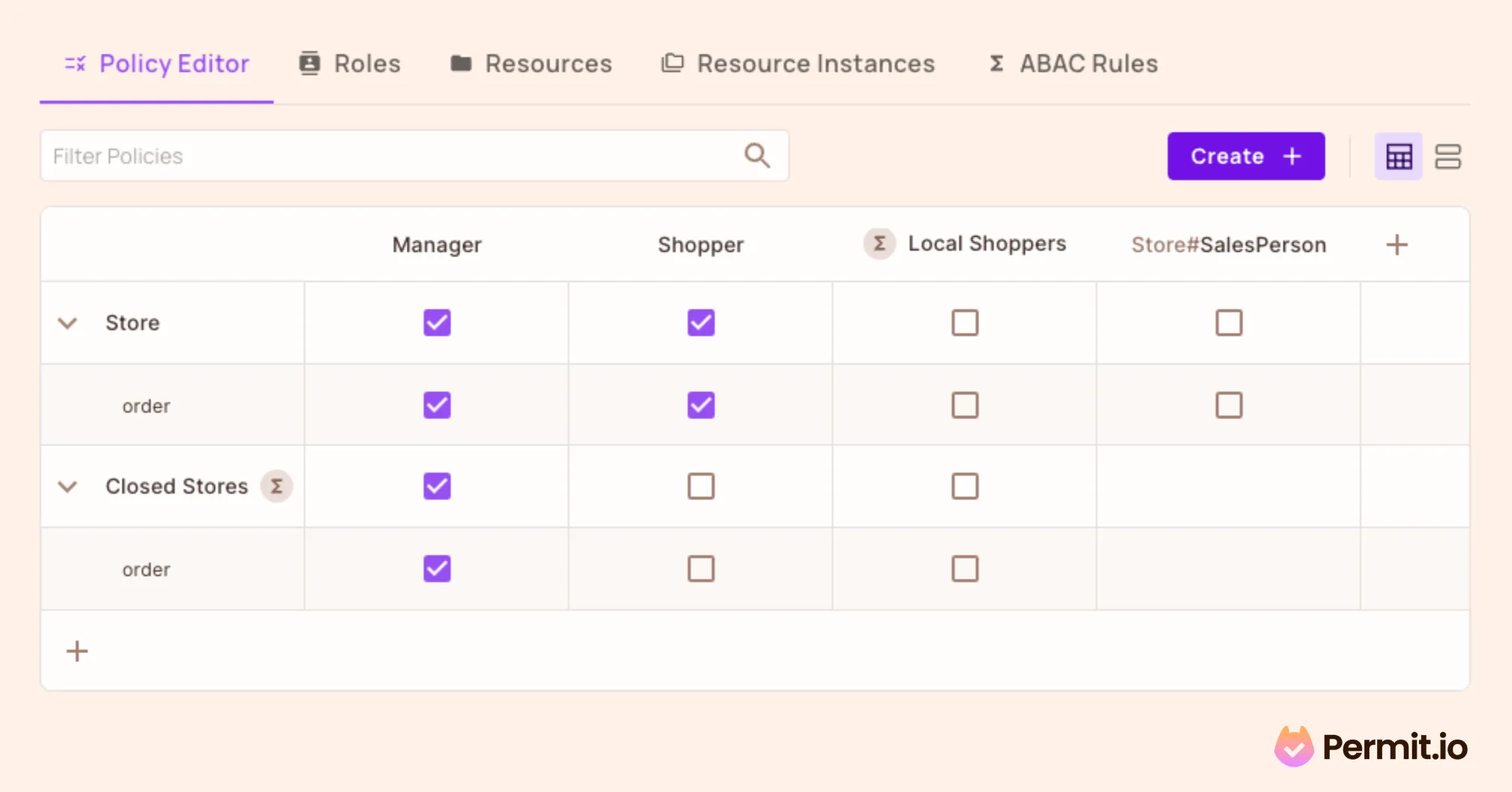
An example of Permit.io's hybrid policy editor combines RBAC, ABAC, and ReBAC in one interface.
Frequently Asked Questions
What is ABAC in simple terms?
ABAC (Attribute-Based Access Control) is an authorization model that decides whether to allow an action by evaluating attributes. Those attributes can describe the user (department, clearance level), the resource (classification, owner), the action (read, approve), and the environment (time, location, device). A policy engine combines them to return allow or deny.
What is an example of attribute-based access control?
A hospital might use this ABAC policy: "A doctor can view a patient's record if they are the assigned physician and the request comes from a hospital network during their scheduled shift." The policy checks the doctor's assignment (user attribute), the patient's record (resource attribute), network location, and shift schedule (environmental attributes).
What is the difference between ABAC and RBAC?
RBAC assigns permissions to roles and users inherit them by holding a role. ABAC evaluates conditions at decision time. RBAC answers "does this user have the right role?" while ABAC answers "do all the relevant attributes satisfy this policy?" RBAC is simpler; ABAC is more flexible when access depends on context.
When should I use ABAC instead of RBAC?
Use ABAC when you need rules that depend on dynamic data, such as time of day, geographic location, resource sensitivity, or billing status. If you find yourself creating new RBAC roles for each new condition, that is a sign you need ABAC. Many teams combine the two: RBAC for broad job-function boundaries and ABAC for fine-grained conditions.
Is ABAC harder to implement than RBAC?
ABAC policies are more expressive, which adds complexity. You need reliable attribute data at decision time, a policy engine that can evaluate conditions, and tooling for auditing which attributes were used in each decision. Solutions like Permit.io simplify this by generating policy code from a visual editor and keeping attribute data in sync.
Further Reading
Want to discuss authorization with other developers? Join our Slack community.