


Loading
3366 Members
 Join Permit's Slack
At my previous company, Rookout, we rebuilt the authorization system five times before the company was three years old. Not because we were bad engineers — the opposite. Permissions look like application logic until they become infrastructure. You start with if user.role == "admin". Then customers arrive with multi-tenant requirements, custom roles, and audit expectations, and suddenly you need fine-grained authorization: deciding whether a specific principal can perform a specific action on a specific resource, in context. That logic does not belong scattered across handlers. It belongs in a dedicated control plane — but one that does not turn every request into a remote dependency.
Most SaaS products start the same way. An admin, a member, a viewer. A controller checks the role. The frontend hides a button. For an early product, that is reasonable.
Then customers ask for more precise access. A workspace admin should invite users but not manage billing. A finance user should approve invoices but not edit projects. A contractor should access only assigned resources. One enterprise customer wants custom roles. Another wants different permissions per environment.
This is where role explosion starts. Teams encode these requirements into ever-more-specific roles, trying to capture tenant context, resource ownership, and environment in flat permission names. The problem is not RBAC itself. RBAC is often a good starting model. The problem is DIY RBAC scattered across conditionals that nobody can reason about.
Permissions in application code fail gradually. Logic tangles — one handler checks role names, another checks ownership, a job filters by tenant. Access changes become deployments. Frontend and backend drift. Denial is hard to explain. And scale exposes architectural shortcuts: token bloat when embedding permissions in JWTs, forced re-auth when permissions change mid-session, and latency from coupling every request to a central IAM service.
You externalize authorization when access rules become contextual, customer-facing, or evidence-driven:
At that point, authorization is a security boundary, a product capability, and an operational workflow. It needs its own system.
Confusing these is one of the most common reasons teams overestimate what an IdP can provide for application permissions.
| Category | Authentication | Authorization |
|---|---|---|
| Core question | "Who is this principal?" | "Can this principal do this action on this resource?" |
| Common systems | IdP, SSO, OAuth, OIDC, SAML | Policy engine, PDP, authorization control plane |
| Typical data | Identity, login method, groups, token claims | Roles, relationships, attributes, tenant membership, resource ownership |
| Example | "This is Alice from Acme." | "Can Alice approve invoice 456 in Acme's production tenant?" |
Your IdP is foundational. Keep it. Use its identity data as input. But do not force it to become your complete permission system.
Before talking about what works, here is what does not.
Do not replace permission spaghetti with a remote authorization bottleneck. If every request depends on a hosted SaaS call for an access decision, you have traded scattered conditionals for latency and availability risk on your critical path.
Do not embed authorization data in JWTs. The advice from practitioners is blunt: "Don't put authorization data in a JWT." Tokens grow, permissions go stale between refreshes, and revocation becomes painful.
Do not confuse IdP with AuthZ. Teams running Keycloak's fine-grained authorization at scale — 70k to 700k resources — report sync races, stale AuthZ state, and eventual migration to a separate authorization layer while keeping the IdP for authentication.
The goal is not to replace your IdP. The goal is to stop forcing authentication infrastructure, application code, and scattered UI checks to impersonate a complete authorization system.
Before: Permission checks live in application code.
if user.role == "admin":
    approve_invoice(invoice)
Evolve: Now you need real context. Alice can approve an invoice if she is a finance approver for Acme, the invoice belongs to Acme, the amount is under her threshold, and the environment is production. That is not a role check. That is a policy evaluation.
Before architecture: API → scattered authz conditionals → database
After architecture: API → can(user, "approve", invoice) → local PDP → allow/deny
The application still enforces at the point of use. The difference is that the decision comes from a policy engine running locally, not from conditionals buried in handlers.
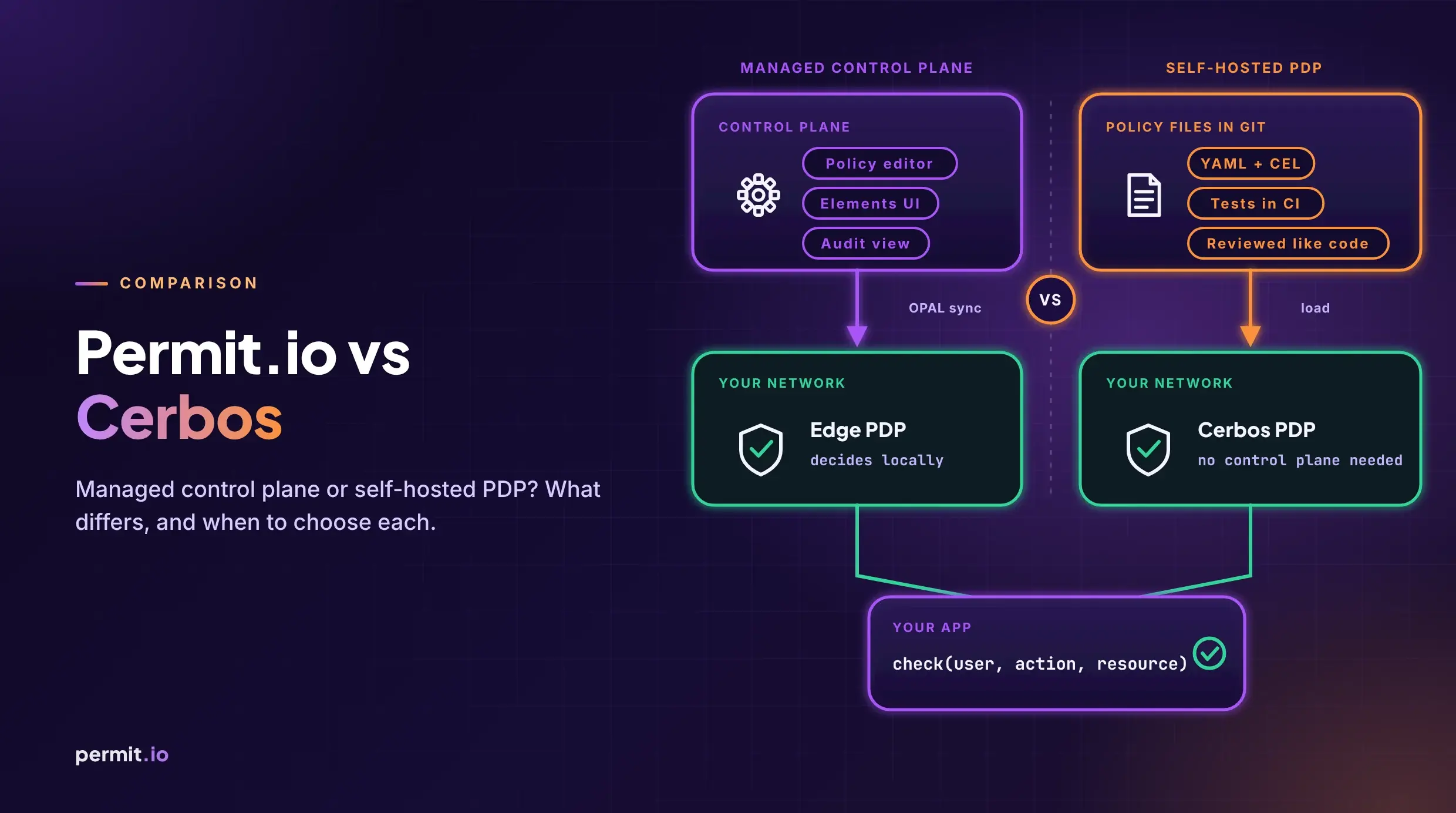
With a control plane: Permit Cloud → OPAL → local PDP
Policy and authorization data are managed centrally, then pushed to local decision points in real time. Your application asks the PDP; the PDP evaluates locally. With a locally deployed PDP, there is no remote SaaS call on the critical path.
The better pattern is to separate policy management from decision enforcement.
Permit.io uses a hybrid model. The control plane runs in Permit Cloud and manages policies, configuration, and authorization administration. The data plane includes a Policy Decision Point (PDP) that can run inside the customer network. Your application asks the PDP for authorization decisions, and the PDP evaluates them locally.
This matters for performance because authorization checks sit on critical paths. If every important operation needs an access decision, the check must be low-latency and close to the application.
It matters for availability because runtime authorization should not depend on a remote control plane being reachable for every request.
It matters for privacy because decisions can happen near your application and data while the control plane manages the policy lifecycle.
Permit uses OPAL, the Open Policy Administration Layer, to push live policy and data updates to PDPs. That allows policies and authorization data to stay synchronized without redeploying application services. The architecture is documented here: How does Permit.io work?.
We built Permit around four principles:
1. Policy centralized, enforcement distributed. Define policy once in the control plane. Enforce everywhere via local PDPs. With a locally deployed PDP, there is no remote SaaS call on the hot path.
2. Not betting on one engine. The PDP can evaluate queries with OPA/Rego or Cedar, depending on the policy model. You pick the engine that fits your use case without rebuilding the authorization layer.
3. AuthZ is not only the decision engine. A production authorization system needs admin UX, sync infrastructure, lifecycle management, audit logs, GitOps workflows, and APIs around the PDP. The decision engine is the core, but it is not the whole system.
4. RBAC → ABAC → ReBAC should not mean rebuilding again. Start with roles. Add attributes when you need them. Add relationships when resource graphs matter. The policy model evolves; the infrastructure stays.
For authorization terms like PDP, policy, resources, roles, and tenants, see the Authorization glossary.
Most teams should not rewrite authorization all at once. Create a clean boundary and move one domain at a time.
Start where permissions hurt most: tenant administration, billing access, project membership, user management. Define the permission model in product language. Who is the principal? What action? What resource? What context — tenant, ownership, environment, plan, status, relationship?
Replace local conditionals with explicit backend enforcement checks. Align frontend visibility after the backend path is correct. Use decision logs during rollout to compare expected allows and denies against real behavior.
The key rule: stop adding new hardcoded permission branches while migrating old ones.
Eventually, someone asks you to prove why access was allowed. Or denied. Or when a role change affected production permissions.
Login logs tell you authentication happened. They do not tell you why a particular application action was authorized.
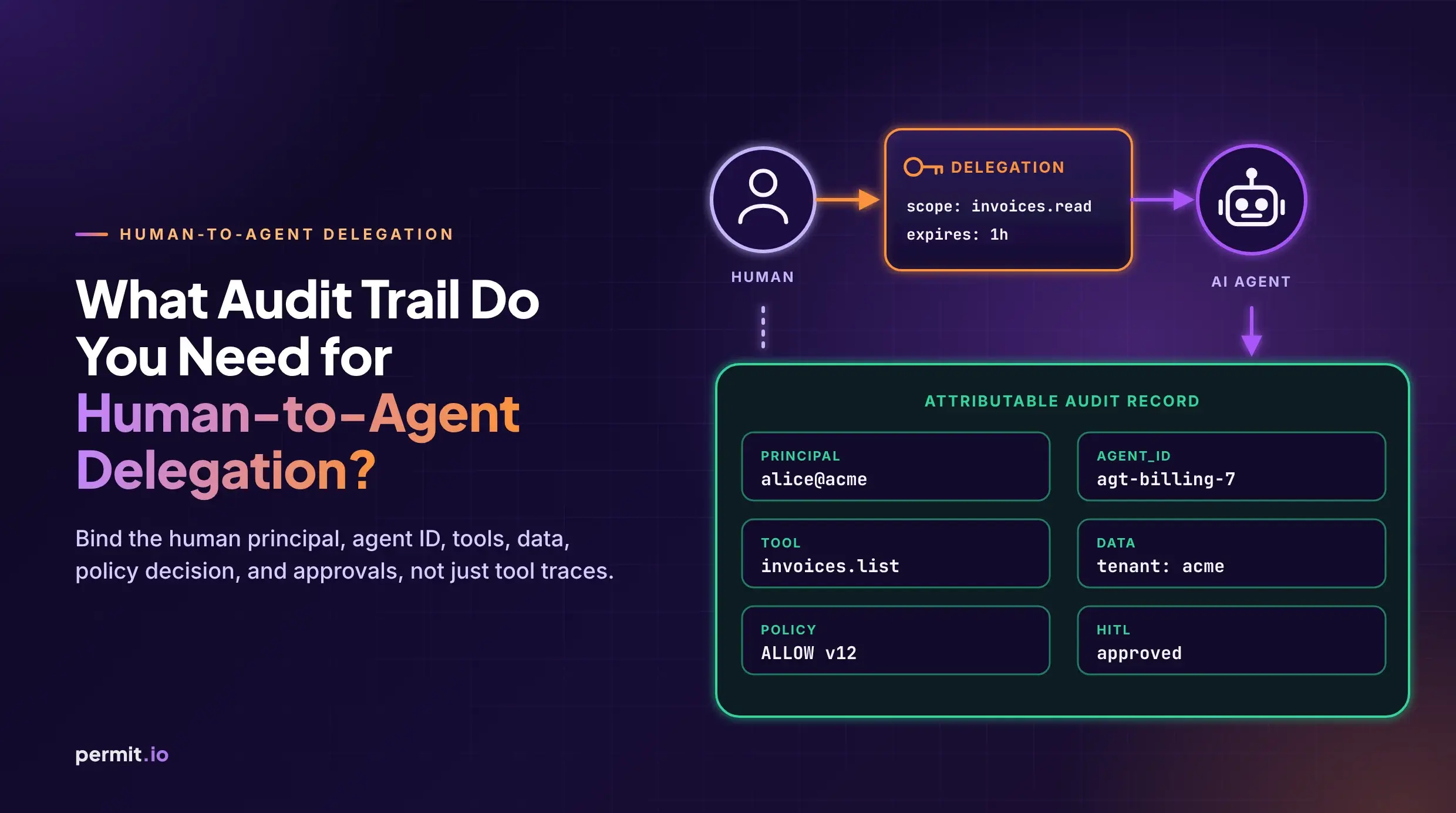
Permit supports basic logs and decision logs. Decision logs include human-readable reasons for allow or deny outcomes. See the docs: Audit logs: types and filtering.
Permit.io is SOC 2 Type II certified and compliant with HIPAA, GDPR, CCPA, and ISO 27001. No authorization vendor makes your company compliant by itself. What a dedicated authorization layer provides is clearer access boundaries, stronger auditability, and better evidence for least privilege controls.
A mature authorization system lets your team answer practical questions quickly. Can this user perform this action on this resource? Where is that policy defined? Who can change it? When did it change? Was the request allowed or denied? Why? Can we prove it later?
If answering those questions requires reading handlers, comparing frontend logic, decoding token claims, and searching logs across services, permissions are still trapped in application code.
Authorization becomes infrastructure: a dedicated, inspectable, enforceable system instead of scattered conditionals. Policy centralized, enforcement distributed, decisions local.
When your product has tenants, custom roles, audit expectations, and real enterprise buyers, stop rebuilding permissions in every handler.
If you are ready to move permissions out of application code, start with the architecture:

Co-Founder / CEO at Permit.io