Securing sensivite information at the database level is now a critical priority for organizations, as traditional access controls often leave gaps that expose data to unauthorized users or grant overly broad permissions that complicate compliance. To address this, we’re introducing Permit.io’s latest capability: full support for database-level authorization through seamless integration with Trino, the powerful open-source distributed SQL query engine. With this integration, teams can enforce fine-grained permissions directly at the data source, ensuring every query is evaluated and filtered before any information leaves the database.
Trino acts as a centralized gateway for querying multiple data sources, making it an ideal enforcement point for authorization. By pairing it with Permit.io's Policy Decision Point (PDP), you can manage policies centrally, apply row-level filtering, column masking, and more, all without modifying your underlying databases. This not only simplifies security but also scales effortlessly across internal tools, such as BI dashboards and external APIs. In this article, we'll explore the challenges of database access control, delve into the benefits of this integration, and provide a practical guide to getting started, complete with a demo setup inspired by real-world examples.
Whether you're an analyst safeguarding proprietary data or a developer building secure applications, this feature positions Permit.io as your go-to solution for robust, policy-based authorization. Let's break it down.
The Growing Need for Database-Level Authorization
Databases are the backbone of modern applications, storing everything from customer records to financial metrics. However, as data volumes grow and access patterns become more complex, relying solely on application-layer checks or basic database roles isn't enough. Common issues include:
- Overly Permissive Access: Granting broad database roles can lead to data leaks, especially when users query through tools like BI software or APIs.
- Lack of Granularity: Traditional systems struggle with fine-grained controls, such as allowing access to specific columns or rows based on user attributes.
- Compliance and Auditing Challenges: Regulations like GDPR or HIPAA demand detailed logs of who accessed what, when, and why—something fragmented auth systems can't easily provide.
- Performance Bottlenecks: Enforcing checks post-query means sensitive data might traverse networks before being filtered, increasing risk and latency.
Permit.io addresses these by extending its authorization platform to the database layer. With Trino as the intermediary, you can route all queries through a single point, where Permit.io evaluates permissions in real-time. This setup supports advanced models like RBAC, ABAC, and ReBAC, allowing you to define policies that filter or mask data dynamically. The result? Secure, efficient access that aligns with your business logic, all managed via Permit.io's intuitive UI.
For organizations with diverse data sources—think PostgreSQL, MySQL, or even big data lakes—Trino's federation capabilities combined with Permit.io's PDP create a unified authorization layer. It's particularly valuable for multi-tenant SaaS apps, where tenant isolation is key, or enterprises needing to audit every query.
Announcing Permit.io's Trino Integration
We're thrilled to roll out this integration, which builds on Permit.io's commitment to fine-grained authorization. Key highlights include:
- Centralized Policy Management: Use Permit.io's Policy Builder to define resources (e.g., tables, columns) and actions (e.g., SelectFromColumns), then enforce them via Trino.
- Data Filtering and Masking: Apply row filters or column masks based on user permissions, ensuring only authorized data is returned.
- Audit-Ready Logs: Every decision is logged in Permit.io, providing a complete trail for compliance.
- Zero-Latency Enforcement: Deploy a local PDP for instant checks, minimizing impact on query performance.
- Easy Schema Sync: Automatically map your Trino schema to Permit.io resources using the Permit CLI.
This isn't just about security—it's about efficiency. Teams can now decouple authorization logic from databases, making it easier to update policies without downtime. Plus, it supports hybrid environments, blending Permit.io with Trino's built-in controls for admin users.
To illustrate the architecture, here's a high-level diagram showing how queries flow through the system:
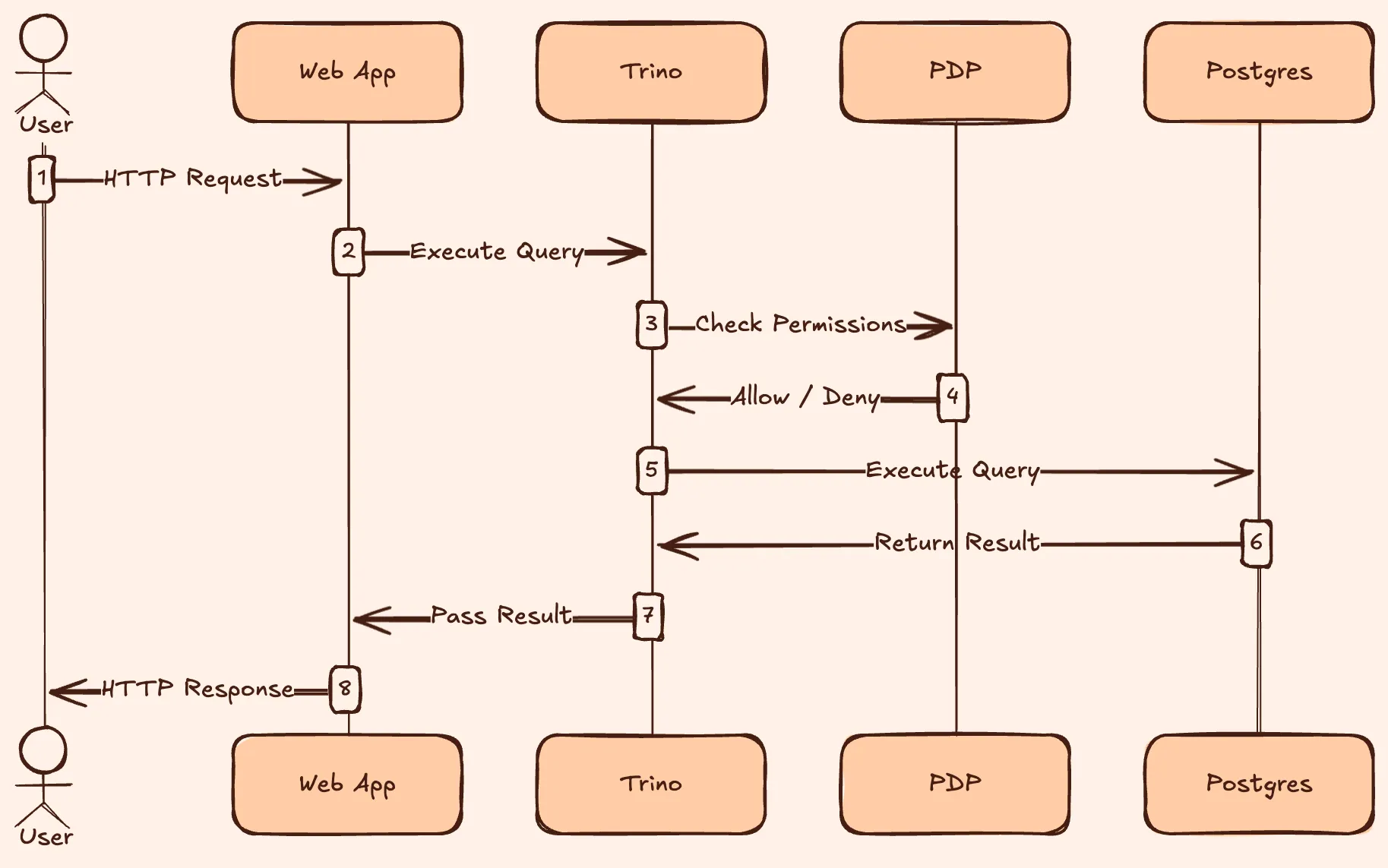
In this flow, Trino consults the PDP for every query, applying Permit.io's decisions before fetching data.
Step-by-Step Guide: Integrating Permit.io with Trino
Let's put this into action with a hands-on guide. We'll set up a demo environment using PostgreSQL as the backend, Trino for querying, and Permit.io for authorization. This mirrors the setup in our public GitHub repo (check it out for full code: https://github.com/permitio/trino-authz-example). The goal is to enforce policies where users can only access certain tables, with row filtering and column masking applied.
What We'll Build
We'll create a simple multi-tenant project management app with a PostgreSQL database containing projects and tasks tables. Authorization rules:
- Admins can query everything.
- Regular users can only see active projects and high-priority tasks, with sensitive columns masked (e.g., truncate descriptions, hide secret keys).
- Use RBAC for roles and ABAC for attribute-based filters.
This demonstrates database-level control for internal analysts or API consumers.
Prerequisites
- Docker and Docker Compose installed.
- A Permit.io account (sign up at app.permit.io).
- Basic knowledge of SQL and YAML.
Tech stack:
- PostgreSQL for data storage.
- Trino for distributed querying.
- Permit.io PDP for authorization decisions.Permit CLI for schema syncing.
Step 1: Plan Your Policies
Start by outlining resources and policies in plain English:
- Resources: Trino system (
trino_sys), catalogs, schemas, tables (e.g., trino_table_postgresql_public_projects), and optionally columns.
- Roles: Admin (full access), User (limited to select actions with filters).
- Actions: ExecuteQuery, SelectFromColumns, plus custom ones like
filter_only_active for rows and AddColumnMask for columns.
- Attributes: User roles and tenant IDs for ABAC checks.
- Relationships: If using ReBAC, define ownership (e.g., users own projects).
In Permit.io's UI, create a new environment for this integration. This isolates your Trino policies.
Step 2: Set Up the Environment
Clone the demo repo and spin up services with Docker Compose:
git clone https://github.com/permitio/trino-authz-example.git
cd trino-authz-example
docker-compose up -d
This launches PostgreSQL, Trino, and a local PDP. Populate the database with sample data (scripts in the repo).
Next, generate an API key from your Permit.io dashboard and set it as an environment variable: export PERMIT_API_KEY=your_key_here.
Step 3: Sync the Schema
Use the Permit CLI to introspect Trino and create matching resources:
permit env apply trino --url http://localhost:8080 --user trino_user --create-column-resources
This command scans catalogs, schemas, tables, and columns, mapping them to Permit.io (e.g., trino_table_postgresql_public_projects). For column-level control, the --create-column-resources flag is key.
Step 4: Configure the PDP and Trino
Deploy the PDP with Trino-specific settings. In your Docker setup, enable PDP_ALLOW_UNAUTHENTICATED_TRINO=True for unauthenticated checks (secure it behind a firewall).
Create a trino-authz.yaml file for filters and masks:
columnMasking:trino_table_postgresql_public_projects:columns:- column_name: description
        view_expression: "CONCAT(SUBSTRING(description, 1, 10), '...')"- column_name: secret_key
        view_expression: "********"rowFilters:trino_table_postgresql_public_projects:- action: filter_only_active
      expression: "status = 'active'"
Mount this to the PDP container at /app/config/trino-authz.yaml.
Update Trino's access-control.properties:
access-control.name=opaopa.policy.uri=http://pdp:7766/trino/allowedopa.policy.row-filters-uri=http://pdp:7766/trino/row-filteropa.policy.batch-column-masking-uri=http://pdp:7766/trino/batch-column-masking
Restart Trino to apply changes.
Step 5: Define and Assign Policies
In Permit.io's Policy Editor, assign roles:
- Grant Admins
ExecuteQuery on trino_sys and full actions on tables.
- For Users, allow
SelectFromColumns with conditions for filters (e.g., ABAC rule: if user.tenant == project.tenant).
Sync users via Permit.io's Directory (e.g., import from your auth provider like Auth0).
Step 6: Enforce and Test
Query Trino as different users. For example, using the Trino CLI:
SELECT * FROM postgresql.public.projects;
As a regular user, you'll see filtered rows (only active projects) and masked columns. Check Permit.io's audit logs to verify decisions.
If issues arise, enable logging in Trino (opa.log-requests=true) and review PDP responses.
Showcasing Results
In our demo, a user query might return:
| id |
name |
status |
description |
secret_key |
| 1 |
Proj A |
active |
First 10 c… |
******** |
| 2 |
Proj B |
active |
Another pr… |
******** |
This ensures sensitive data stays protected. For performance, scale the PDP horizontally if handling high query volumes.
Why This Matters for Your Stack
This Trino integration exemplifies Permit.io's flexibility, turning complex authorization into a streamlined process. It reduces risk, boosts compliance, and frees developers from custom auth code. We've seen teams cut implementation time by 70% while achieving finer control than native database tools.
Ready to try it? Dive into the full demo on GitHub or explore Permit.io's docs for more on RBAC and data filtering.
Join our community on Slack (https://io.permit.io/slack) for support, or check out advanced topics like GitOps integration and AI-driven permissions. With Permit.io, database security is no longer an afterthought—it's built-in and scalable. Let's secure your data together.