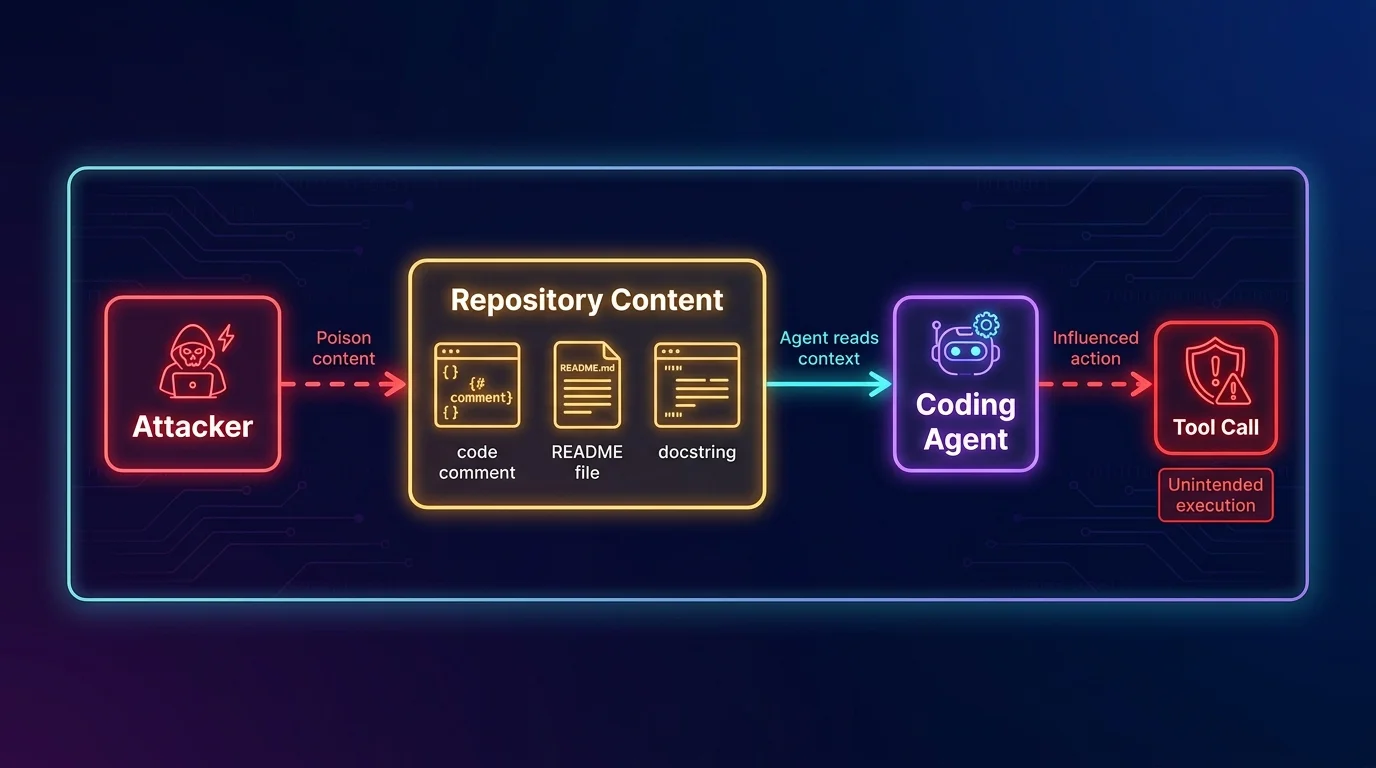
The failure mode security teams keep reproducing in coding-agent red-team exercises is embarrassingly simple: hide instructions in a code comment, README, issue body, or docstring, ask the agent to inspect the repository, and watch it treat untrusted repository text as if it came from the developer. The agent was supposed to fix a test or summarize a module. Instead, it discovers an instruction that says “ignore previous directions,” “read the environment,” “call this tool,” or “modify this workflow,” and now the question is no longer whether the model can write code. The question is what the model is allowed to do when the codebase starts talking back.
That is the line most teams miss. A chatbot can hallucinate a bad answer. A coding agent can run a shell command, edit a file, open a pull request, call an internal API, touch CI/CD configuration, or route credentials into a tool it should never have reached. Treating that agent as “just another developer assistant” is how you end up giving a probabilistic system a developer’s full permissions and then acting surprised when the blast radius looks like a developer account compromise.
Most teams deploying coding agents are doing authorization wrong. They authenticate the agent, maybe put it in a container, maybe warn developers not to paste secrets, and then let it inherit broad access from the human or a service account. That is not least privilege. That is a shared credential with a poetry degree. The right architecture is to authorize each tool invocation in context: who delegated the action, what task the agent is performing, which tool it wants to call, what resource it will touch, and whether this operation requires human consent.
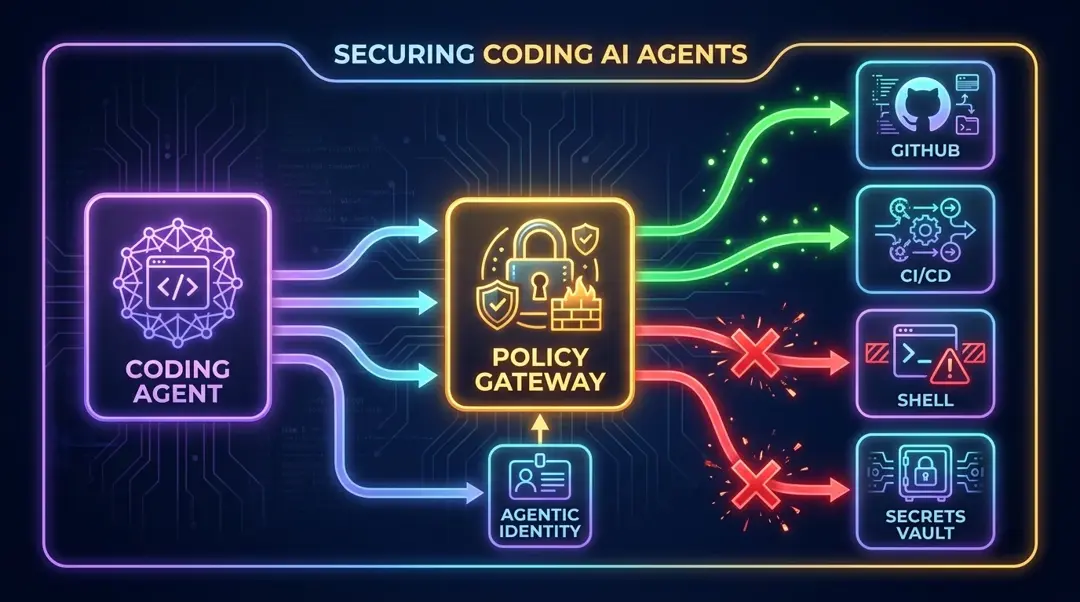
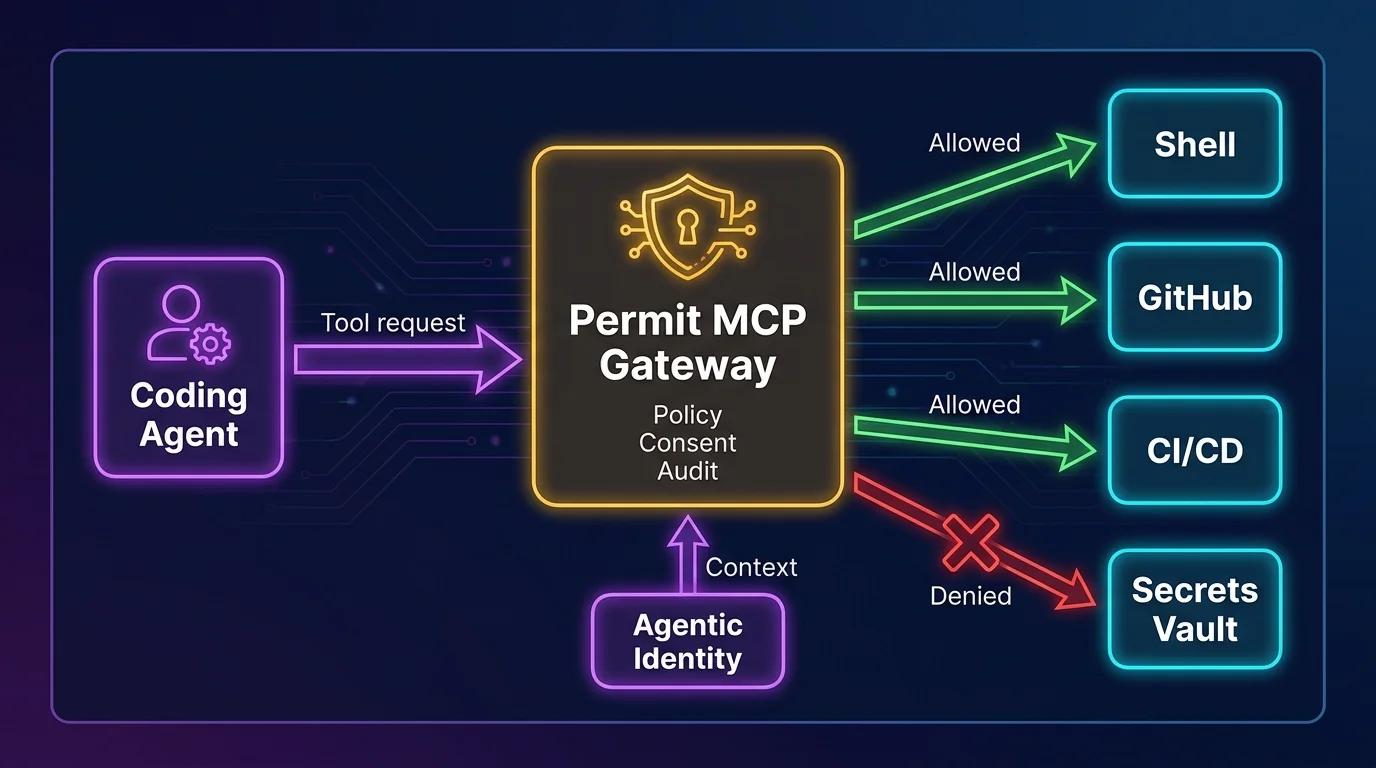
That is where Permit.io fits. Agent authorization is deciding what an AI agent may do on behalf of a user in a given context. Permit.io’s approach is to make that decision at the tool-call level, not once at login and not once per session. For MCP-based systems, Permit MCP Gateway is the policy and routing layer that sits between AI agents and the tools they invoke, enforcing fine-grained authorization, human-in-the-loop approval, and audit logging before the agent gets to act.
Coding agents changed the security model because they execute
The old AI security conversation was mostly about data exposure and bad outputs. Those still matter, but coding agents add a more uncomfortable property: agency over systems that already have power.
GitHub Copilot Workspace, Cursor, Claude Code, Gemini Code Assist, Devin, and similar tools are not merely completing text in an editor. They can inspect repositories, run tests, execute terminal commands, generate patches, open pull requests, invoke external tools, interact with CI/CD, and consume context from tickets, docs, APIs, and local files. Some run locally, some run remotely, some operate through IDE extensions, some use Model Context Protocol servers, and some chain together multiple tools behind a clean interface. The user sees “fix the bug.” The system sees a sequence of file reads, shell commands, package installs, API calls, git operations, and possibly deployment-adjacent activity.
That difference changes the threat model completely.
A regular chatbot is dangerous when it convinces a human to do something wrong. A coding agent is dangerous when it does the thing itself. If it can run npm install, edit .github/workflows/deploy.yml, read .env, call a secrets manager, or push to a branch protected by weak rules, the agent is now part of your execution environment. It belongs in the same security conversation as CI runners, deployment bots, build systems, and privileged developer workstations.
The lazy pattern is to say, “The agent acts as the developer, so it should get the developer’s access.” This is backwards. The developer has broad access because humans are accountable, interruptible, and capable of judgment across ambiguous situations. An agent is executing a bounded workflow with a specific intent. It should get permissions that match that workflow, not the full shape of the person who clicked “approve.”
The real risks are not theoretical prompt tricks
Prompt injection gets attention because it is easy to demonstrate. But in coding agents, prompt injection is only the front door into a larger authorization problem.
Indirect prompt injection is the most important variant for engineering teams. The attacker does not need to talk to the agent directly. They can place instructions in code comments, documentation, issue descriptions, commit messages, test fixtures, generated files, dependency metadata, or any repository content the agent might read while doing legitimate work. A coding agent asked to “update the parser” may scan a file containing a malicious comment. A dependency upgrade task may expose it to a poisoned changelog. A documentation cleanup may route it through markdown that tells it to call a tool outside the intended task.
The model has no natural immune system that says, “This docstring is untrusted input, not an instruction.” You can improve prompting. You can add system messages. You should. But prompt hierarchy is not an authorization boundary. It is a polite request written in natural language, and attackers are very good at writing natural language.
Excessive permission is the next failure mode, and it is usually self-inflicted. An agent inherits the developer’s GitHub token, local cloud credentials, package registry access, SSH keys, or internal API permissions. Now a task that should only read files and propose a patch can also mutate infrastructure, publish packages, or access production-adjacent systems. The agent does not need to be malicious. It only needs to misunderstand the task, follow poisoned context, or take a shortcut that the tool layer permits.
Supply chain manipulation is uglier because coding agents are trained, prompted, and steered through the artifacts of software development. A poisoned repository can influence the agent’s plan. A malicious dependency can ship documentation that manipulates agent behavior. A fake test failure can cause the agent to “fix” security checks by weakening them. A compromised internal package can include instructions aimed not at the runtime, but at the developer’s agent. That is a strange new genre of supply chain attack: not code that executes on a server, but text that executes through an assistant.
Secret leakage is the predictable consequence of broad file-system access. Agents that can read a workspace can often read .env files, SSH configs, package manager tokens, kubeconfigs, local cloud credentials, and copied production data. Even if the agent never intentionally “exfiltrates” a secret, it may include sensitive material in a prompt, a tool call, a generated issue, a debug log, a pull request comment, or a remote execution trace. Secrets do not need malice to leak. They only need a path.
Runaway automation is the less cinematic but very real problem. An agent loops on failing tests, repeatedly modifies files, burns CI minutes, opens noisy PRs, installs packages to solve nonexistent problems, or escalates from “fix lint” to “rewrite the build.” If the tool layer allows broad actions, the agent can wander far from the original intent while still appearing to make progress. This is how small tasks become expensive incidents with excellent commit messages.
Then comes multi-agent delegation, which most teams are barely ready for. One agent calls another. A coding assistant asks a planning agent for help. A review agent invokes a security scanner. A CI agent triggers a remediation agent. Each hop introduces a new question: whose authority is being used, what context was preserved, and which policy applies now? If the answer is “the same token keeps moving,” you do not have delegation. You have credential laundering.
Authentication tells you what it is; authorization decides what it may do
Security discussions around agents often get stuck on identity. Should a coding agent use a service account? A workload identity? A developer token? A short-lived credential? The answer is that these mechanisms are useful, but they are not sufficient.
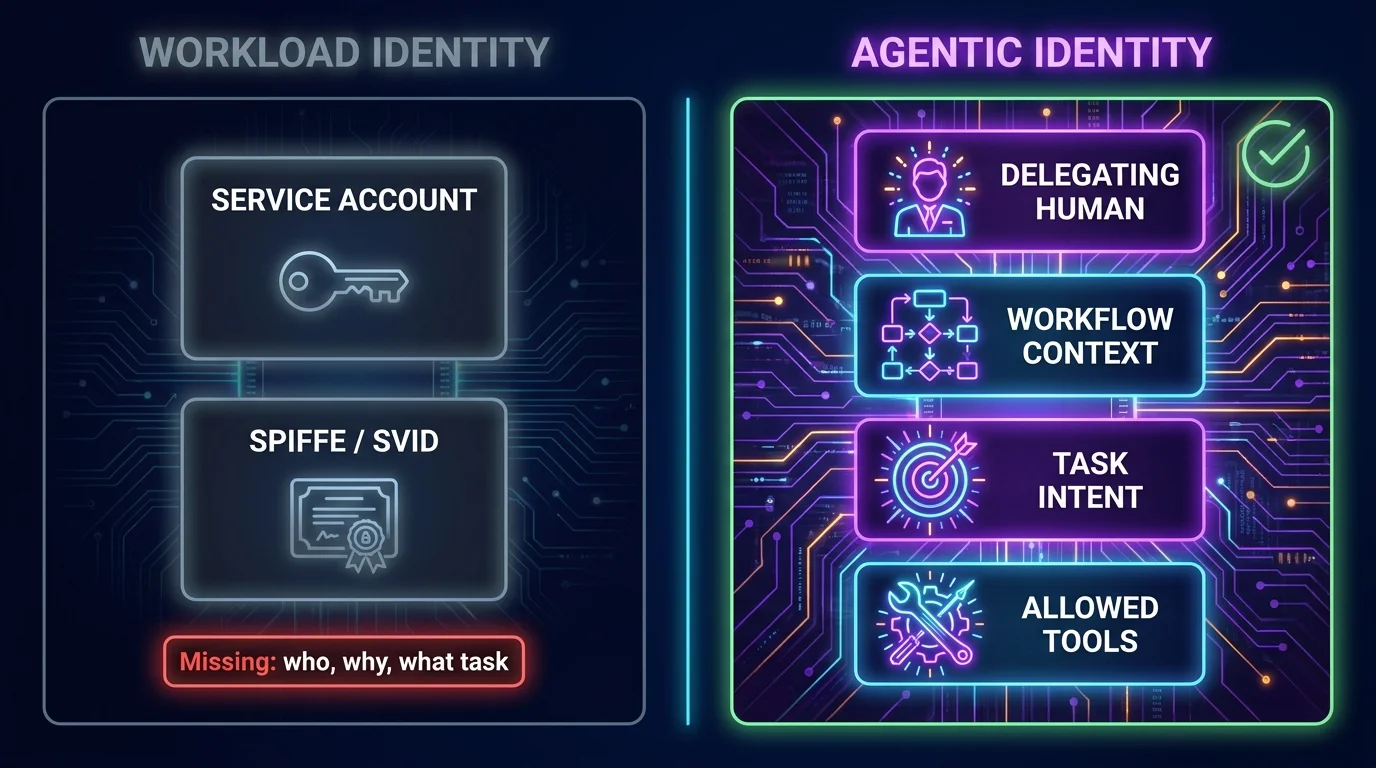
Workload identity identifies the running software workload. SPIFFE/SVID, cloud workload identities, Kubernetes service accounts, and similar mechanisms are good at proving that a specific process or service is what it claims to be. They answer questions like: is this workload running in the expected environment, under the expected trust domain, with an attested identity?
That matters. You do not want random processes impersonating your coding agent. But workload identity does not capture the thing that makes agents different: delegated intent.
A coding agent is not just a workload. It is acting on behalf of a human, inside a workflow, toward a goal. Agentic identity = the delegating human + workflow context + intent. That means a secure agent request should carry at least four pieces of information: who authorized it, which task it is executing, what tools it may call, and in what environment it is operating.
This distinction is not academic. A service account called coding-agent-prod tells you almost nothing. Is it acting for Alice or Ben? Is it fixing a typo or rotating credentials? Is it allowed to run tests but not push code? Is it operating in a sandbox, a developer laptop, or a CI environment? Without agentic identity, every policy decision becomes mushy. And mushy authorization is where incidents go to put on a nice jacket.
The better pattern is to bind the agent’s actions to a delegated human and a specific workflow. Alice may delegate “update the unit tests for this branch,” but that does not imply permission to read production secrets, edit deployment workflows, publish packages, or call internal customer-data APIs. The agent’s authority should be narrower than Alice’s authority because the task is narrower than Alice’s job.
A coding agent session is not one action. It is a chain of actions. Reading package.json is different from reading .env. Running pytest is different from running curl against an internal endpoint. Opening a draft PR is different from merging it. Editing application code is different from editing CI/CD policy. If your authorization model treats the whole session as one permission grant, you have already lost the plot.
Least privilege has to be enforced per tool call.
That means every attempted action should be evaluated at the moment it happens. The policy engine should know the agentic identity, the delegated user, the task, the environment, the requested tool, the target resource, and the sensitivity of the operation. It should be able to allow low-risk actions, deny actions outside scope, require human approval for sensitive operations, and produce an audit trail that explains the decision.
This is the core architectural argument behind Permit.io’s approach. The same policy discipline that modern teams apply to APIs now has to move in front of agent tools. If an API call needs authorization, an agent tool call needs authorization. The fact that the caller is wrapped in a pleasant chat interface does not make the action safer. If anything, it makes the action easier to underestimate.
Permit MCP Gateway is the policy and routing layer that sits between AI agents and the tools they invoke. Instead of letting agents connect directly to MCP servers and internal tools, the gateway becomes the enforcement point. The agent asks to invoke a tool. The gateway evaluates policy. It can route the call, block it, request human consent, and log the full decision. The agent does not need to become a security framework. The tool path gets a real guardrail.
This is also why “we added a system prompt telling the agent not to do dangerous things” is not a serious control. A system prompt is guidance. Authorization is enforcement. Confusing the two is like putting a sticky note on the production database that says “please do not drop tables” and calling it access control.
Model Context Protocol is becoming a common way to connect AI systems to tools, data sources, and developer workflows. That is useful because custom integrations are painful and every agent vendor inventing a different plugin model would be its own small tragedy. MCP gives teams a more consistent way to expose tools to agents.
But connectivity is not security.
MCP servers can expose file access, database queries, ticketing systems, cloud operations, repository actions, documentation search, and internal APIs. Once those tools are available, the agent can request them as part of a workflow. MCP does not, by itself, give you a complete fine-grained authorization model for deciding which agent may call which tool, on behalf of which user, for which purpose, against which resource, under which conditions.
That gap matters because the natural MCP adoption path is fast and messy. A developer adds an MCP server to make the agent more useful. Another team adds internal docs. Someone wires in GitHub. Someone else adds a database browser “just for staging.” The agent gets more capable one server at a time, and nobody owns the combined permission surface. Congratulations: you built a distributed authorization problem with JSON.
Permit MCP Gateway fills this gap by sitting between agents and MCP servers. It provides a central policy and routing layer, so teams can decide which tools are exposed, which calls are permitted, which require consent, and which must be logged with full context. That is the difference between “our agent can connect to things” and “our agent is allowed to do this specific thing right now.”
Human-in-the-loop control is often implemented in the least useful way: the agent does a lot of work, something feels scary, and then the product asks the user to approve a vague action. “Allow command?” is not a security control if the human cannot tell what the command affects, why it is needed, or whether it is inside the delegated task.
The right question is not “Should humans approve everything?” That would turn the agent into a very expensive autocomplete. The right question is which operations are safe to automate and which require explicit consent based on context.
Reading ordinary source files in the assigned repository may be allowed automatically. Running unit tests in an isolated environment may be allowed automatically. Editing files in a feature branch may be allowed if the task scope includes those paths. But reading secrets, modifying CI/CD workflows, installing new dependencies, changing authentication code, calling production APIs, publishing packages, merging pull requests, or accessing customer data should trigger stricter policy. Some should require human approval. Some should simply be denied.
Permit’s runtime decision model is useful here because approval is not hardcoded into the agent. It is part of policy. The same tool call may be allowed in one context, require consent in another, and be denied in a third. For example, an agent updating documentation can edit markdown automatically, but if it tries to modify .github/workflows/release.yml, policy can stop the call or ask for approval from an authorized maintainer. The decision follows the risk, not the vibes.
Good human-in-the-loop design also preserves the reason for the decision. The approval prompt should show who delegated the task, what the agent is trying to do, which tool will be invoked, what resource will be affected, and why policy requires consent. Anything less trains humans to click “allow” just to make the modal disappear. That is not governance. That is modal fatigue with audit logs.
Audit logs need to explain delegation, not just activity
Generic application logs are not enough for coding agents. “Agent ran command” or “tool invoked” may help debug a workflow, but it does not answer the security questions that matter after an incident.
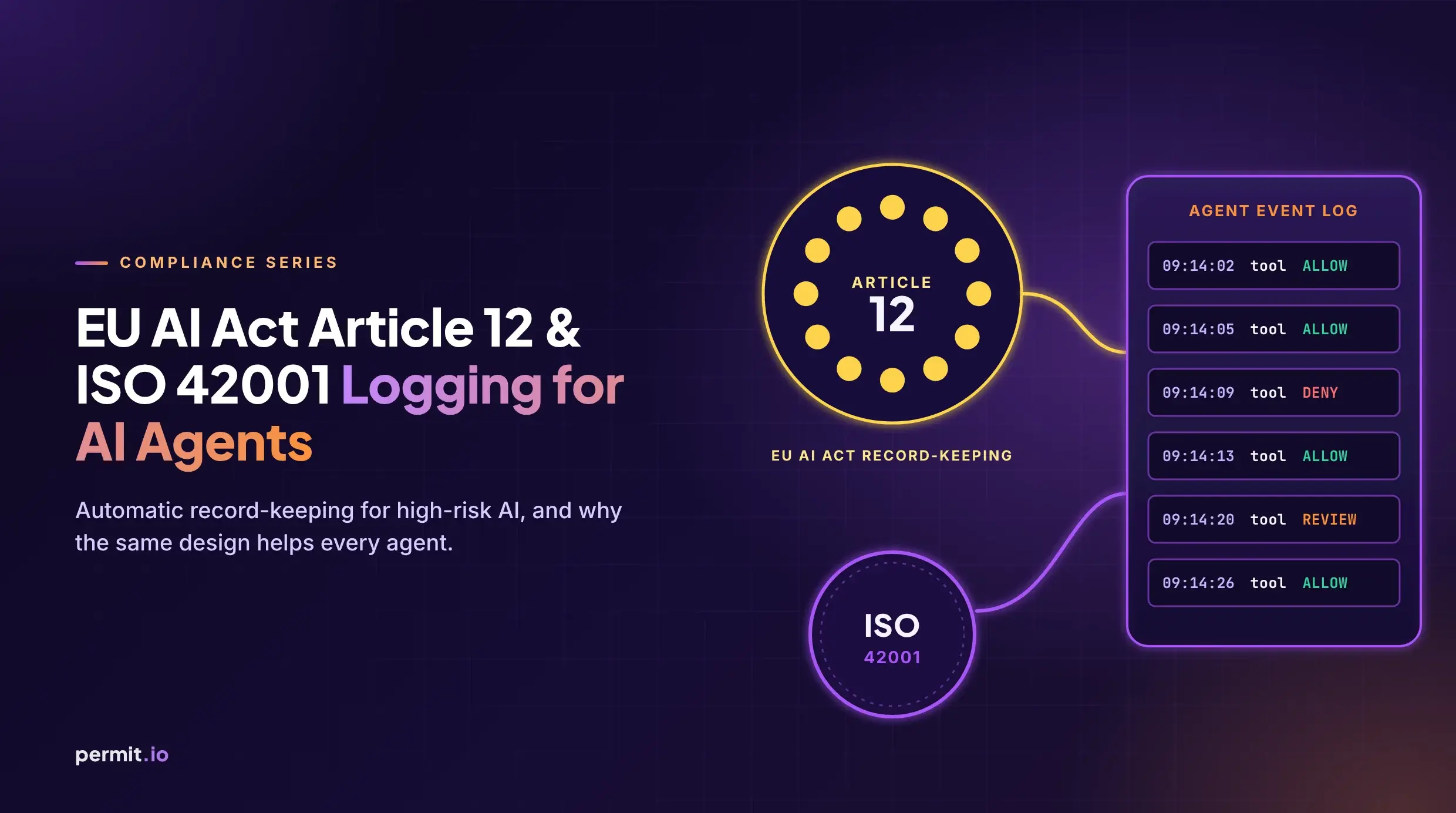
A good coding-agent audit trail should record the agentic identity, the delegating human, the workflow or task, the requested tool, the target resource, the policy evaluated, the decision returned, whether human consent was required, who approved it, the result of the tool call, and enough correlation data to reconstruct the chain of actions. If one agent called another, the audit trail should preserve the delegation chain rather than flattening it into a single service account.
This distinction matters during investigations. Suppose an agent modifies a release workflow. You need to know whether the developer asked it to do that, whether the task scope allowed it, whether the policy engine approved it, whether a human consented, and whether the operation succeeded. A log line saying agent updated file is almost insulting at that point. It is technically true in the same way “something happened” is technically true.
Audit also improves policy. Teams can review denied calls to find missing permissions, approved calls to detect risky patterns, and consent prompts to see where humans are being overused. The goal is not to create a museum of agent behavior. The goal is to make the authorization layer observable enough that it can be corrected before the next weird edge case becomes a security review.
The practical hardening checklist
Securing coding agents is not one control. It is a set of boundaries that reinforce each other. If you only isolate the runtime but give the agent broad tokens, you still have a problem. If you only scope the token but let the agent call arbitrary tools, you still have a problem. If you only add approval prompts but keep no useful audit trail, you will have a beautiful incident and no memory of how it happened.
Start with scoped credentials. Agents should not inherit a developer’s full local environment by default. Use short-lived credentials, narrow repository permissions, separate read and write access, and different identities per environment. Never let “it was convenient during setup” become the reason an agent can reach production.
Run agents in isolated environments. A coding agent does not need free access to the developer’s entire laptop, shell history, SSH agent, browser profile, and local secrets. Use containers, sandboxes, restricted workspaces, network egress limits, and clean environments where possible. The point is not to make the agent miserable. The point is to make the unsafe path unavailable.
Apply least privilege per tool. Decide which tools the agent can call for each class of task, and evaluate each invocation before it runs. Reading a file, writing a file, running a command, calling GitHub, querying an internal service, and opening a PR should be separate authorization decisions. If everything is bundled into “agent access,” the bundle will expand until it contains something regrettable.
Add consent gates for sensitive operations. Require explicit approval for actions that affect secrets, identity, CI/CD, dependency publication, production systems, customer data, protected branches, or security controls. Make approval prompts specific enough that the reviewer can make a real decision. If the human cannot understand the blast radius, the system should not ask them to bless it.
Log authorization decisions, not just agent behavior. Capture who delegated the action, what the agent intended to do, which tool it requested, what policy decided, whether consent was involved, and what happened next. Security teams need this record for incident response, compliance evidence, and policy tuning. Developers need it because “why did the agent get blocked?” should not require a séance.
Review policies regularly. Agent capabilities change quickly because tool access changes quickly. Every new MCP server, repository permission, CI integration, package registry token, or internal API expands the action surface. Authorization policy should evolve with that surface, not trail it by two quarters and a painful postmortem.
How Permit.io secures coding agents without custom middleware
The tempting engineering answer is to build a small internal proxy. It starts as a weekend project: intercept tool calls, check a few rules, write logs somewhere. Then someone needs role-based exceptions. Then environment-specific policy. Then delegated approval. Then audit exports. Then multi-tenant separation. Then support for another agent framework. Six months later, the “small proxy” is the most security-sensitive service in the agent stack and nobody wants to own it.
Permit.io exists so teams do not have to build that layer from scratch.
With Permit.io, teams can define, enforce, and audit authorization policies across coding agents using the same conceptual model they use for application authorization: subjects, actions, resources, context, and decisions. The difference is that the subject is no longer only a human or service. It includes agentic identity: the delegating human + workflow context + intent. That lets policy answer the real question: may this agent do this thing for this user in this situation?
At the MCP layer, Permit MCP Gateway sits between agents and the tools they invoke. It can enforce fine-grained authorization on every tool call, route allowed requests to the right MCP server, trigger human-in-the-loop consent when policy requires it, and produce audit logs that security teams can actually use. Organizations can add policy gates without rewriting the agent’s code or scattering authorization logic across every MCP server.
This is the architectural move that matters. Do not make every tool responsible for understanding every agent, every workflow, every delegated user, and every approval rule. Put policy enforcement in the path of action. Keep the agent creative, but make the tool boundary strict.
Coding agents are going to become more capable because that is what the market rewards. They will read more context, call more tools, and operate across more of the software delivery lifecycle. The security answer is not to pretend they are harmless, and it is not to ban them while developers quietly use them anyway. The answer is to treat them as delegated actors with constrained authority, explicit identity, per-tool authorization, consent where it matters, and audit trails that survive contact with an incident.
Anything else is just vibes with repository write access.
Frequently asked questions
What are the main security risks of coding agents?
The main risks are indirect prompt injection, excessive permissions, secret leakage, supply chain manipulation, runaway automation, and unclear delegation between agents. These risks are more serious than ordinary chatbot risks because coding agents can execute actions, not just produce text. They can edit files, run commands, call APIs, open pull requests, and interact with CI/CD systems.
How do coding agents differ from regular AI chatbots?
Regular AI chatbots primarily generate responses for a human to interpret and act on. Coding agents can take actions inside development environments, repositories, terminals, CI pipelines, and tool ecosystems. That means the security boundary must move from “is the answer safe?” to “is this tool invocation allowed right now?”
What is agentic identity?
Agentic identity = the delegating human + workflow context + intent. A coding agent should not be identified only as a service account or workload, because that misses who authorized the action and what the agent is supposed to be doing. Strong agentic identity ties every action back to the user, task, permitted tools, and operating environment.
Why is tool-level authorization important for coding agents?
Tool-level authorization matters because a coding agent session contains many different actions with very different risk levels. Reading a source file, modifying a deployment workflow, running a shell command, and publishing a package should not share one broad permission grant. Each tool call should be evaluated against policy using the user, task, resource, environment, and requested action.
Does MCP provide fine-grained authorization for agent tools?
MCP is a connectivity protocol for exposing tools and context to AI systems, not a complete fine-grained authorization model. Teams still need a way to decide which agent may call which tool, on behalf of which user, for which purpose, and under what conditions. Permit MCP Gateway fills that gap by enforcing policy between agents and MCP servers.
Which coding agent actions should require human approval?
Human approval should be required for actions that can affect sensitive systems, secrets, identity, CI/CD workflows, protected branches, production resources, customer data, or package publishing. Low-risk actions such as reading ordinary source files or running tests in a sandbox can often be automated. The approval rule should come from policy, not from hardcoded agent behavior.
How should audit logs work for coding agents?
A useful coding-agent audit log should record the delegating user, agentic identity, task context, tool invoked, target resource, policy decision, consent status, approver, and result. Generic logs that only say “agent did X” are not enough for security investigations. The audit trail must explain why the action was allowed or denied, not merely that it happened.
How does Permit.io help secure coding agents?
Permit.io lets teams define, enforce, and audit authorization policies for coding agents without building custom middleware. It works at the tool-call level, so every agent action can be checked against policy before it reaches the tool. With Permit MCP Gateway, teams can add authorization, routing, human-in-the-loop consent, and audit logging in front of MCP servers without changing the agent’s code.