

Loading
3366 Members
 Join Permit's Slack
Authorization has evolved well beyond simple role checks. Two popular approaches today are relationship-based access control (ReBAC) and attribute-based access control (ABAC). In this post, we’ll break down the difference between these two patterns, and show how you can model ReBAC using Permit.io (with Terraform) and ABAC using Cedar.
Policy-based access control (PBAC) is an umbrella concept: you externalize authorization logic from application code and enforce it through a policy engine.
Attribute-based access control (ABAC) is a subset of PBAC, where access decisions are based on evaluating attributes of:
Example ABAC rule:
“Allow access if user.department == resource.department and resource.sensitivity == low.”
ReBAC, by contrast, uses relationships (like ownership, membership, hierarchy) as the primary mechanism to decide whether a user can access a resource.
In many real-world systems, document sharing platforms, organizational structures, and nested projects, relationships drive access more than attributes do. ReBAC is designed for this.
Examples of relationships:
ReBAC is particularly useful when:
ABAC shines in scenarios where:
Example:
A user can view a document only if they belong to the same department as the document’s owner, and the document sensitivity level is “low.”
In ABAC, the engine evaluates explicit rules over attributes, rather than traversing relationship graphs.
We’ll use a concrete example to compare ReBAC and ABAC implementations.
Scenario: A user can view a document if:
- They are the document owner
- They have direct viewer access
- They belong to a group that has viewer access on the document’s folder
- They are an admin of the organization that owns the document
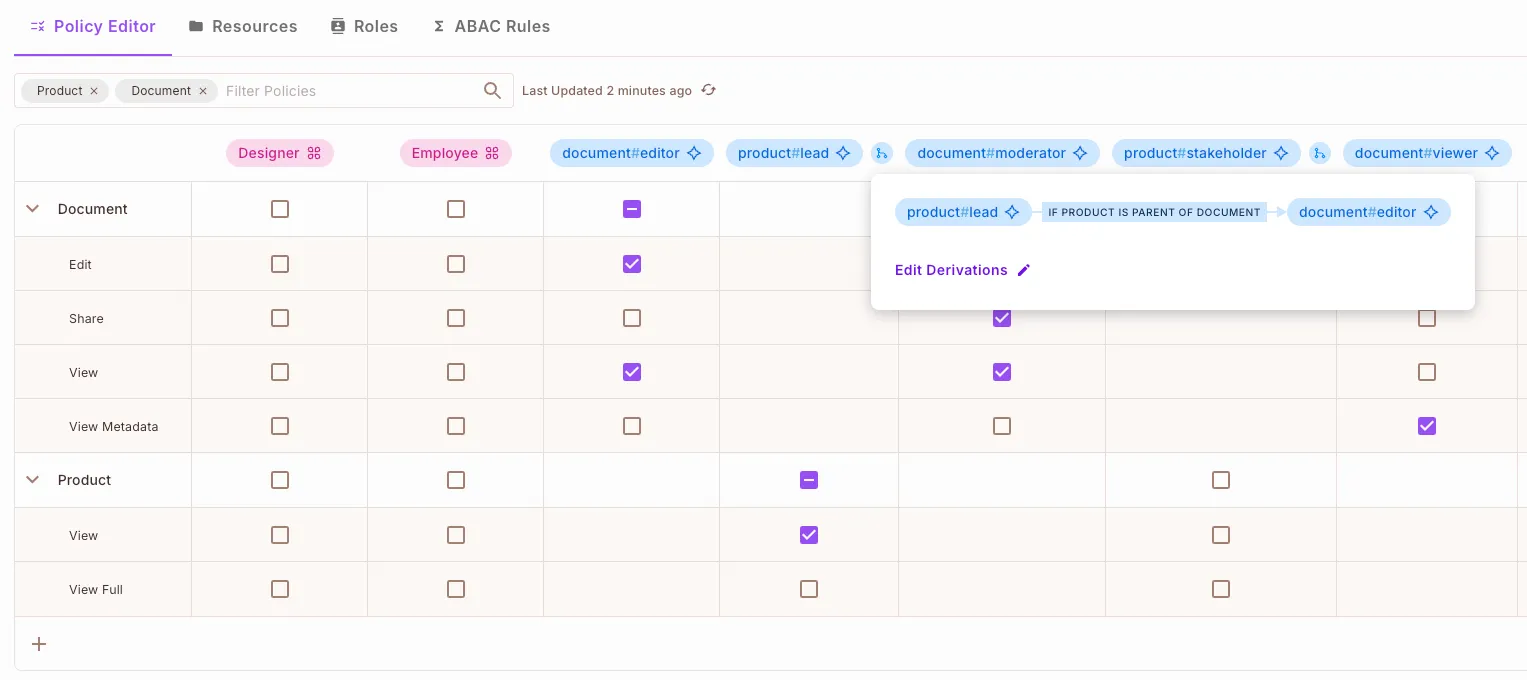
With Permit.io, you model resources, relations, and role derivations to represent inheritance and access propagation. Unlike engines like OpenFGA, Permit.io also lets you edit and manage these policies directly through a visual UI (Policy Editor).
terraform {
  required_providers {
    permitio = {
      source  = "registry.terraform.io/permitio/permit-io"
      version = "~> 0.0.14"
    }
  }
}

provider "permitio" {
  api_key = var.permit_api_key
}

resource "permitio_resource" "organization" {
  key  = "organization"
  name = "Organization"

  actions = {
    "admin"  = { name = "Administer" }
    "member" = { name = "Member" }
  }
}

resource "permitio_resource" "folder" {
  key  = "folder"
  name = "Folder"

  actions = {
    "view"  = { name = "View" }
    "edit"  = { name = "Edit" }
    "share" = { name = "Share" }
  }
}

resource "permitio_resource" "document" {
  key  = "document"
  name = "Document"

  actions = {
    "view"   = { name = "View" }
    "edit"   = { name = "Edit" }
    "delete" = { name = "Delete" }
    "share"  = { name = "Share" }
  }
}
# Folder roles
resource "permitio_role" "folder_viewer" {
  key         = "viewer"
  name        = "Folder Viewer"
  resource    = permitio_resource.folder.key
  permissions = ["folder:view"]
}

resource "permitio_role" "folder_editor" {
  key         = "editor"
  name        = "Folder Editor"
  resource    = permitio_resource.folder.key
  permissions = ["folder:view", "folder:edit", "folder:share"]
}

resource "permitio_role" "folder_owner" {
  key         = "owner"
  name        = "Folder Owner"
  resource    = permitio_resource.folder.key
  permissions = ["folder:view", "folder:edit", "folder:share"]
}

# Document roles
resource "permitio_role" "doc_viewer" {
  key         = "viewer"
  name        = "Document Viewer"
  resource    = permitio_resource.document.key
  permissions = ["document:view"]
}

resource "permitio_role" "doc_editor" {
  key         = "editor"
  name        = "Document Editor"
  resource    = permitio_resource.document.key
  permissions = ["document:view", "document:edit", "document:share"]
}

resource "permitio_role" "doc_owner" {
  key         = "owner"
  name        = "Document Owner"
  resource    = permitio_resource.document.key
  permissions = [
    "document:view", "document:edit", "document:delete", "document:share"
  ]
}

# Organization roles
resource "permitio_role" "org_member" {
  key         = "member"
  name        = "Organization Member"
  resource    = permitio_resource.organization.key
  permissions = ["organization:member"]
}

resource "permitio_role" "org_admin" {
  key         = "admin"
  name        = "Organization Admin"
  resource    = permitio_resource.organization.key
  permissions = ["organization:admin"]
}
This is where ReBAC shines: we propagate access through relations.
# Folder viewer inherits document viewer
resource "permitio_role_derivation" "folder_viewer_to_doc_viewer" {
  resource    = permitio_resource.document.key
  role        = permitio_role.doc_viewer.key
  on_resource = permitio_resource.folder.key
  to_role     = permitio_role.folder_viewer.key
  linked_by   = "parent"
}

# Folder editor inherits document editor
resource "permitio_role_derivation" "folder_editor_to_doc_editor" {
  resource    = permitio_resource.document.key
  role        = permitio_role.doc_editor.key
  on_resource = permitio_resource.folder.key
  to_role     = permitio_role.folder_editor.key
  linked_by   = "parent"
}

# Org member inherits document viewer
resource "permitio_role_derivation" "org_member_to_doc_viewer" {
  resource    = permitio_resource.document.key
  role        = permitio_role.doc_viewer.key
  on_resource = permitio_resource.organization.key
  to_role     = permitio_role.org_member.key
  linked_by   = "organization"
}

# Org admin inherits document viewer
resource "permitio_role_derivation" "org_admin_to_doc_viewer" {
  resource    = permitio_resource.document.key
  role        = permitio_role.doc_viewer.key
  on_resource = permitio_resource.organization.key
  to_role     = permitio_role.org_admin.key
  linked_by   = "organization"
}
With these derivations, a user with viewer access on a folder automatically gains viewer access on all documents in that folder.
Permit.io provides developers with a permission management solution that allows smooth transitioning between RBAC, ABAC, and ReBAC all without changing your application code.
The Permit Policy Editor makes this possible with a no-code UI that automatically generates Rego policies for all three models and syncs them seamlessly with your Git, API, and UI interfaces.
This means both developers and non-technical stakeholders can create and manage ReBAC policies, build complex graph hierarchies, and define relationships between entities all visually, without writing a single line of code.
In the editor, relations (graph edges) can be created between resources (graph nodes) with just a few clicks, offering an intuitive, low-code experience for defining access logic.
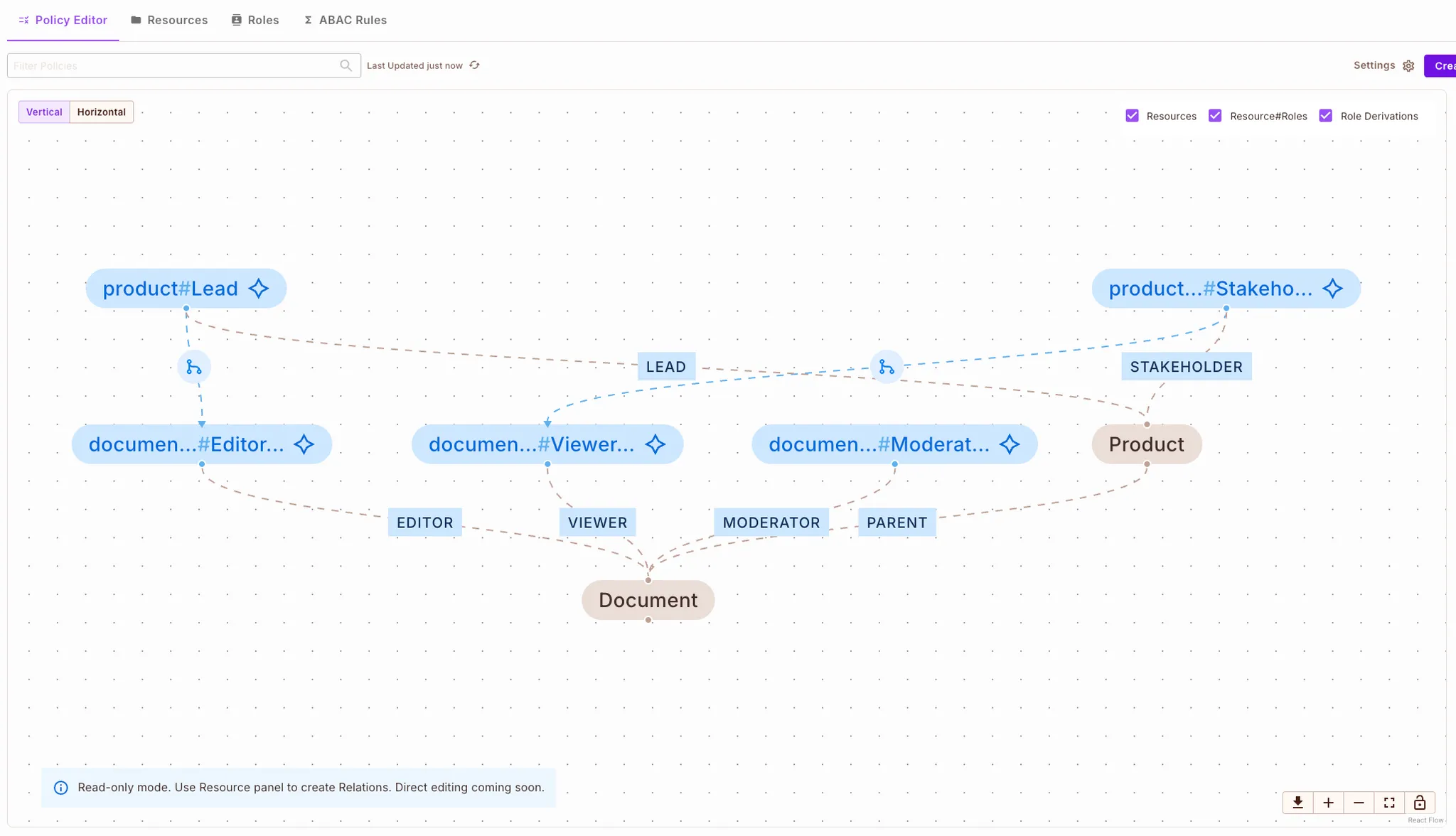
Try the Permit.io Policy Editor
Here’s what the same logic looks like with Cedar policy language, using attributes rather than relationships:
permit(
  principal,
  action == DocumentManagement::Action::"ViewDocument",
  resource
) when {
  principal == resource.owner
  or principal in resource.viewers
  or principal in resource.folderViewers
  or principal.organization == resource.organization
};
The difference is clear:
With Cedar, you explicitly check each attribute
With Permit.io’s ReBAC, relationships and derivations handle inheritance implicitly
In addition to the relationship-based model above, you can also use Permit.io to model attribute-based access control (ABAC). For example, you might define user attributes like department, resource attributes like sensitivity, and then create dynamic rules such as:
“Allow view on document if user.department == resource.department and resource.sensitivity == 'low'”.
In the Permit.io dashboard or via Terraform/API, you can integrate user sets, resource sets, and attribute conditions to enforce this ABAC rule set all without rewriting your application logic.
| Aspect | Permit.io (ReBAC) | Cedar (ABAC) |
|---|---|---|
| Core mechanism | Graph-based relations and derivations | Attribute evaluation |
| Inheritance | Native (role derivations) | Manual (explicit checks) |
| Ideal for | Sharing, nested hierarchies, complex relationships | Attribute-driven rules, simpler structures |
| Integration | Hosted service + SDKs + Terraform | Policy engine + attribute fetch in application |
| Access control changes | Managed via relations | Requires policy updates or extra attribute logic |
Permit.io (ReBAC) is a great fit if your system is relationship-heavy: folders, shared documents, organizations, team memberships
Cedar (ABAC) fits best when access rules are attribute-driven and hierarchies are minimal
Permit.io unifies ReBAC and ABAC for broader organizational needs. Many teams implement a hybrid access control model with Permit.io, using ReBAC for structural permissions and ABAC for fine-grained conditions. (Permit.io supports this hybrid model directly and is compatible with Cedar using Cedar-Agent)
Both ReBAC and ABAC are powerful authorization models. ReBAC simplifies complex inheritance and sharing through relations, while ABAC keeps policies explicit and attribute-based.
Using Terraform with Permit.io allows you to infrastructure-as-code your authorization model, manage authorization as code alongside your app logic, version it, test it, and evolve it as your product grows.
📘 Cedar Language Reference

Co-Founder / CEO at Permit.io