PostgreSQL is a powerful, open-source relational database that offers great features for managing data in multi-tenant applications. Implementing proper access controls becomes vital for data security and isolation when serving multiple customers from a shared database instance. While PostgreSQL provides sophisticated permission mechanisms, configuring them correctly for complex multi-tenant applications requires careful planning.
This guide will walk you through implementing fine-grained PostgreSQL permissions for multi-tenant applications, from basic role management to advanced row-level security. You’ll learn how to leverage PostgreSQL’s built-in features to create a secure and scalable permission architecture.
What We’ll Build
This guide will walk you through the creation of a permission system for a SaaS application that serves multiple organizations (tenants) with different user roles. Our implementation will ensure:
- Tenant isolation: Users can only access data belonging to their organization
- Role-based access control: Different permission levels within each organization
- Fine-grained permissions: Column and row-level access restrictions
- Scalable architecture: A system that grows with your application

Access Control Policies We’ll Implement
Here’s what our permission system will enforce (In plain English):
- Users can only access data from organizations they belong to
- Within their organizations, users are restricted by their role (Admin/Member/Viewer)
- Admins can manage all organizational data and assign roles
- Members can create and modify projects and tasks
- Viewers can only read data, never modify it
Prerequisites
Before diving into our implementation, you’ll need to have a few things in place:
The PostgreSQL Permission System
Let’s start by understanding the fundamental building blocks of PostgreSQL’s permission system.
Understanding Roles in PostgreSQL
In PostgreSQL, a role is a database entity that can own database objects and have database privileges. Roles can represent individual users or groups of users.
What makes PostgreSQL’s approach unique is that it unifies users and groups into a single concept - roles. A role can:
- Have the ability to log in (making it a “user”)
- Include other roles as members (making it a “group”)
- Own database objects like tables and functions
- Be granted specific privileges on objects
This flexibility allows for powerful and granular permission management.
Running Postgres With Docker
Before we can continue with exploring the Postgres permission system, let’s first run our Postgres database with Docker:
Pull the PostgreSQL image:
docker pull postgres
Run a PostgreSQL container:
docker run --name postgres-db -e POSTGRES_PASSWORD=mysecretpassword -p 5432:5432 -d postgres
Connect to your PostgreSQL container:
docker exec -it postgres-db psql -U postgres
Creating Basic Roles
Let’s create some basic roles to see how this works:
-- Create application roles (groups)CREATE ROLE app_admin NOLOGIN;
CREATE ROLE app_member NOLOGIN;
CREATE ROLE app_viewer NOLOGIN;
-- Create user roles (can login)CREATE ROLE alice LOGIN PASSWORD 'secure_password1';
CREATE ROLE bob LOGIN PASSWORD 'secure_password2';
CREATE ROLE carol LOGIN PASSWORD 'secure_password3';
-- Assign application roles to usersGRANT app_admin TO alice;
GRANT app_member TO bob;
GRANT app_viewer TO carol;
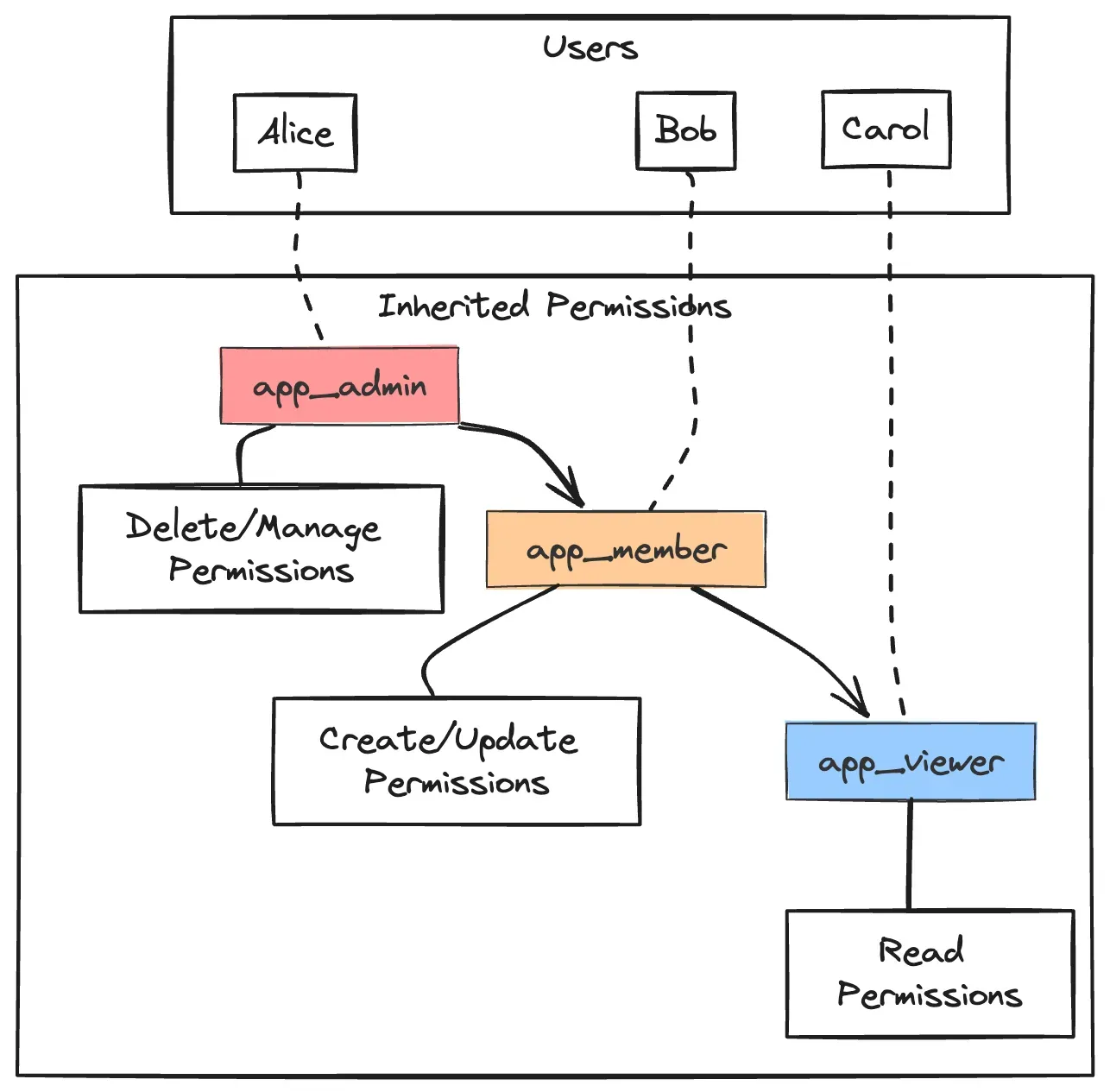
The NOLOGIN attribute specifies that these roles cannot connect to the database directly - they’re meant to be used as groups. In contrast, the user roles have the LOGIN privilege.
Role Inheritance
PostgreSQL supports role inheritance, where roles can inherit permissions from other roles:
-- Make app_admin inherit app_member permissionsGRANT app_member TO app_admin;
-- Make app_member inherit app_viewer permissionsGRANT app_viewer TO app_member;
With this hierarchy, app_admin users automatically get all permissions assigned to app_member and app_viewer, while app_member users get all permissions assigned to app_viewer.
Basic Permission Types
Before diving into multi-tenancy, let’s review the basic permission types in PostgreSQL:
| Permission |
Description |
Example Use |
| SELECT |
Read data from a table |
View projects list |
| INSERT |
Add new rows to a table |
Create new task |
| UPDATE |
Modify existing rows |
Edit project details |
| DELETE |
Remove rows from a table |
Delete a task |
| TRUNCATE |
Empty a table completely |
Clear all completed tasks |
| REFERENCES |
Create foreign keys to a table |
Link tasks to projects |
| TRIGGER |
Create triggers on a table |
Automatic task status updates |
| CREATE |
Create new objects in a schema |
Make new tables or views |
| USAGE |
Access objects in a schema |
Use custom data types |
| EXECUTE |
Run functions or procedures |
Call business logic functions |
You can grant these permissions using the GRANT statement:
-- Grant SELECT permission on the projects table to app_viewer roleGRANT SELECT ON projects TO app_viewer;
-- Grant all permissions on the tasks table to app_member roleGRANT ALL PRIVILEGES ON tasks TO app_member;
While the basic permission system is useful, it falls short for multi-tenant applications because:
- It lacks context awareness (who is accessing which tenant’s data)
- It becomes complex to maintain across many tables and roles
- It has no built-in tenant isolation
Let’s address these limitations by building a more sophisticated multi-tenant permission system.
Planning Multi-Tenant RBAC Architecture
Before writing any code, let’s plan our multi-tenant RBAC (Role-Based Access Control) architecture.
Data Model
We’ll use the following tables for our SaaS application:
-- Organizations (tenants)CREATE TABLE organizations (
    id UUID PRIMARY KEY DEFAULT gen_random_uuid(),
    name TEXT NOT NULL,
    created_at TIMESTAMP WITH TIME ZONE DEFAULT now()
);
-- UsersCREATE TABLE users (
    id UUID PRIMARY KEY DEFAULT gen_random_uuid(),
    email TEXT UNIQUE NOT NULL,
    full_name TEXT,
    created_at TIMESTAMP WITH TIME ZONE DEFAULT now()
);
-- Organization memberships and rolesCREATE TABLE org_members (
    organization_id UUID REFERENCES organizations(id) ON DELETE CASCADE,
    user_id UUID REFERENCES users(id) ON DELETE CASCADE,
    role TEXT NOT NULL CHECK (role IN ('admin', 'member', 'viewer')),
    created_at TIMESTAMP WITH TIME ZONE DEFAULT now(),
    PRIMARY KEY (organization_id, user_id)
);
-- ProjectsCREATE TABLE projects (
    id UUID PRIMARY KEY DEFAULT gen_random_uuid(),
    organization_id UUID NOT NULL REFERENCES organizations(id) ON DELETE CASCADE,
    name TEXT NOT NULL,
    description TEXT,
    created_at TIMESTAMP WITH TIME ZONE DEFAULT now()
);
-- TasksCREATE TABLE tasks (
    id UUID PRIMARY KEY DEFAULT gen_random_uuid(),
    project_id UUID NOT NULL REFERENCES projects(id) ON DELETE CASCADE,
    title TEXT NOT NULL,
    description TEXT,
    status TEXT DEFAULT 'todo',
    assigned_to UUID REFERENCES users(id) ON DELETE SET NULL,
    created_at TIMESTAMP WITH TIME ZONE DEFAULT now()
);
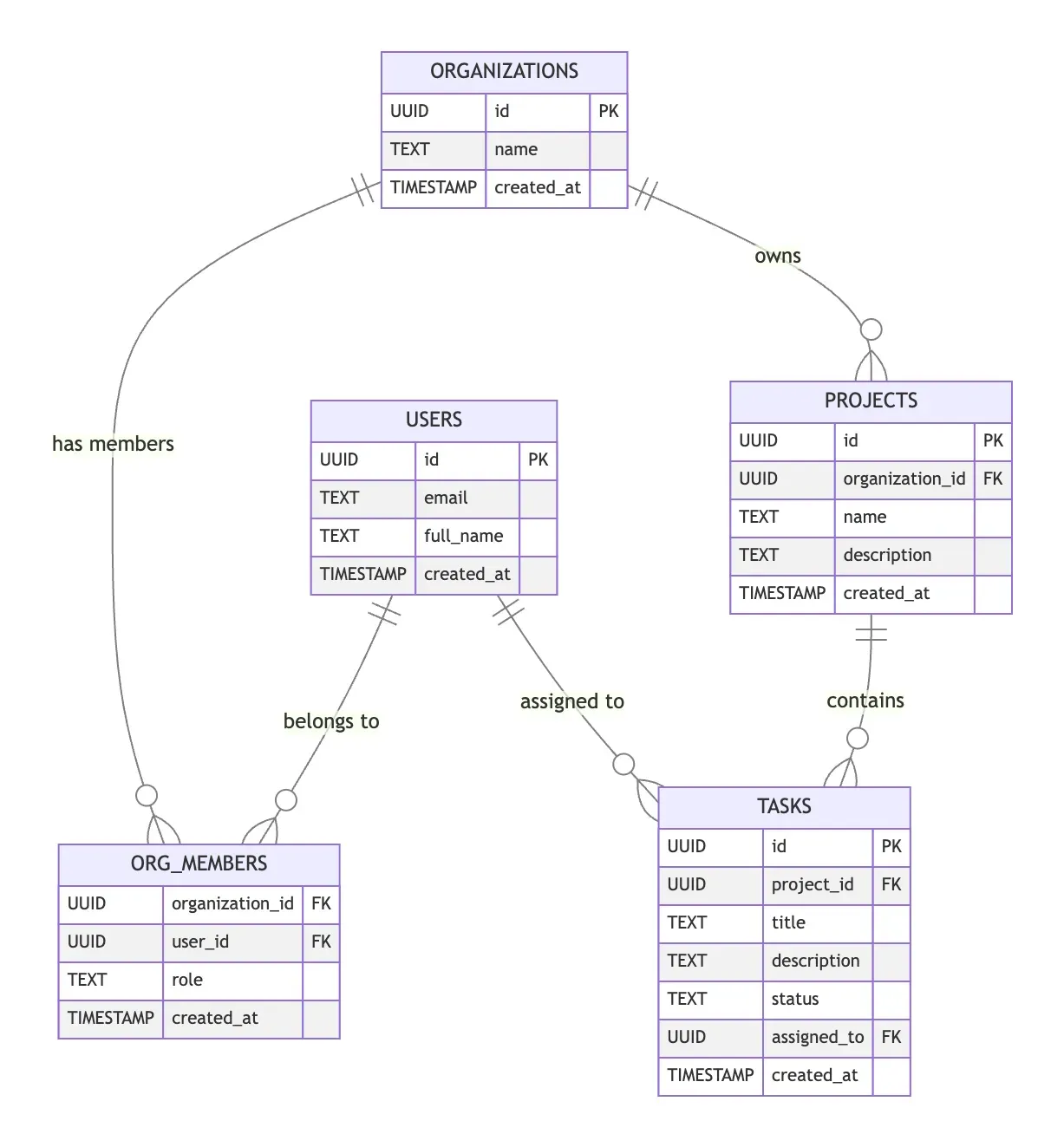
This model supports multi-tenancy with an organizations table representing our tenants, and each project having an organization_id to denote ownership.
Tenancy Model
For multi-tenant applications, there are three common approaches:
- Database per tenant: Each tenant gets a separate database
- Schema per tenant: Each tenant gets a separate schema within a shared database
- Row-based tenancy: All tenants share tables, with a tenant ID column in each row
We’ll implement row-based tenancy because it’s the most resource-efficient and works well for applications with many tenants. Each table related to tenant data will have an organization_id field (either directly or through relationships).
Implementing Row-Level Security for Tenant Isolation
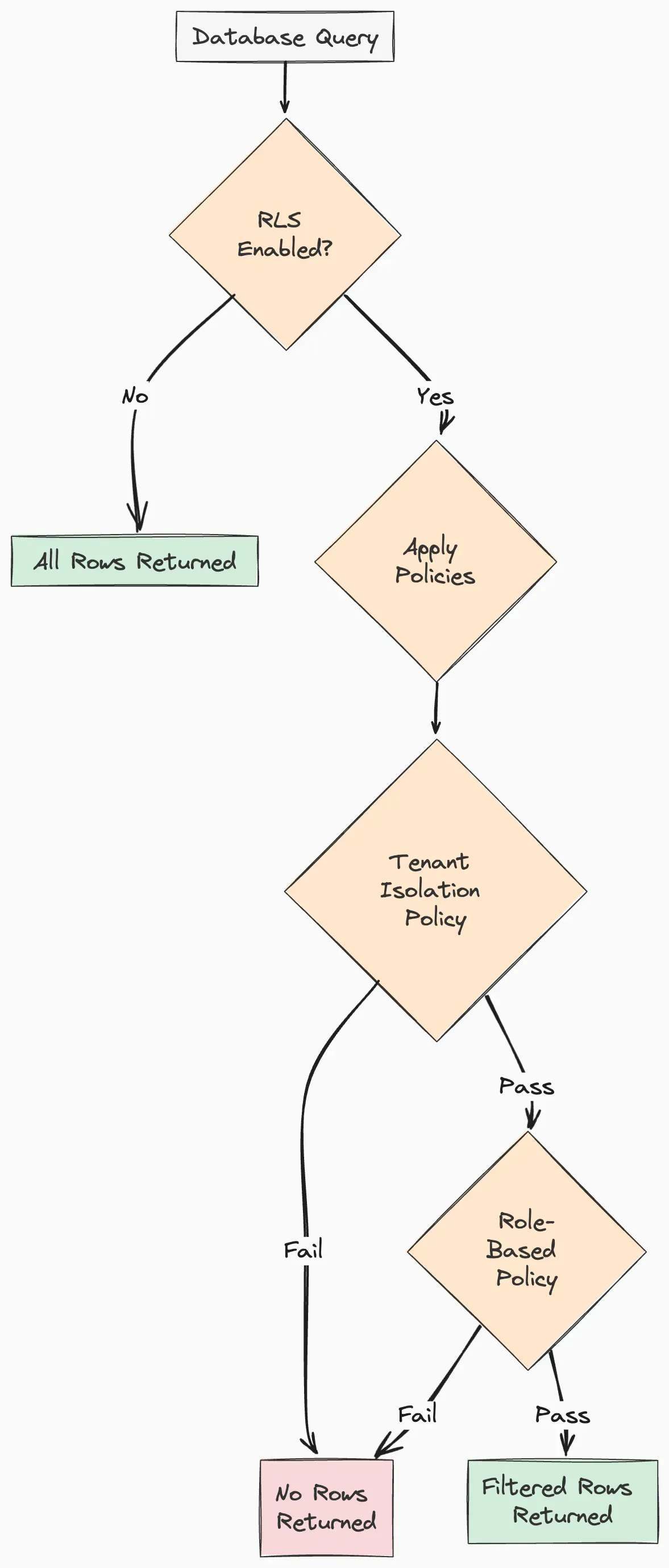
The key to implementing strong tenant isolation in PostgreSQL is Row-Level Security (RLS). RLS allows us to define policies that filter which rows a user can see or modify.
Enabling RLS on Tables
First, let’s enable RLS on our multi-tenant tables:
-- Enable RLS on tables that contain tenant dataALTER TABLE projects ENABLE ROW LEVEL SECURITY;
ALTER TABLE tasks ENABLE ROW LEVEL SECURITY;
ALTER TABLE org_members ENABLE ROW LEVEL SECURITY;
Tracking User and Tenant Context
To make RLS work, we need a way to track the current user and their tenant context. PostgreSQL provides session variables that can store this information:
-- Function to set the current user contextCREATE OR REPLACE FUNCTION set_current_user_id(user_id UUID)
RETURNS VOID AS $$
BEGIN    PERFORM set_config('app.current_user_id', user_id::TEXT, false);
END;
$$ LANGUAGE plpgsql;
-- Function to set current organization contextCREATE OR REPLACE FUNCTION set_current_organization_id(org_id UUID)
RETURNS VOID AS $$
BEGIN    PERFORM set_config('app.current_organization_id', org_id::TEXT, false);
END;
$$ LANGUAGE plpgsql;
-- Function to get current user IDCREATE OR REPLACE FUNCTION current_user_id()
RETURNS UUID AS $$
BEGIN    RETURN nullif(current_setting('app.current_user_id', true), '')::UUID;
END;
$$ LANGUAGE plpgsql;
-- Function to get current organization IDCREATE OR REPLACE FUNCTION current_organization_id()
RETURNS UUID AS $$
BEGIN    RETURN nullif(current_setting('app.current_organization_id', true), '')::UUID;
END;
$$ LANGUAGE plpgsql;
Your application will use these functions to set the proper context when a user connects to the database.
Creating RLS Policies for Tenant Isolation
Now, let’s create RLS policies that enforce tenant isolation:
-- Policy for projects: users can only see projects from their organizationCREATE POLICY tenant_isolation_policy ON projects
    FOR ALL    USING (organization_id = current_organization_id());
-- Policy for tasks: users can only see tasks from projects in their organizationCREATE POLICY tenant_isolation_policy ON tasks
    FOR ALL    USING (project_id IN (
        SELECT id FROM projects
        WHERE organization_id = current_organization_id()
    ));
-- Policy for org_members: users can only see members of their organizationCREATE POLICY tenant_isolation_policy ON org_members
    FOR ALL    USING (organization_id = current_organization_id());
With these policies in place, users will only see data from their own organization, regardless of their database role or privileges.
Implementing Role-Based Permissions Within Tenants
Now that we have tenant isolation, let’s implement role-based permissions within each tenant.
Checking User Roles
First, we need a function to check a user’s role within their current organization:
-- Function to get user's role in the current organizationCREATE OR REPLACE FUNCTION current_user_role()
RETURNS TEXT AS $$
DECLARE    user_role TEXT;
BEGIN    SELECT role INTO user_role
    FROM org_members
    WHERE organization_id = current_organization_id()
    AND user_id = current_user_id();
    RETURN user_role;
END;
$$ LANGUAGE plpgsql;
-- Function to check if user has a specific role or higherCREATE OR REPLACE FUNCTION has_role(required_role TEXT)
RETURNS BOOLEAN AS $$
DECLARE    user_role TEXT;
BEGIN    user_role := current_user_role();
    RETURN CASE
        WHEN user_role = 'admin' THEN true        WHEN user_role = 'member' AND required_role IN ('member', 'viewer') THEN true        WHEN user_role = 'viewer' AND required_role = 'viewer' THEN true        ELSE false    END;
END;
$$ LANGUAGE plpgsql;
Role-Based Policies
Now, let’s refine our RLS policies to incorporate role-based permissions:
-- Projects: viewing vs. modifying based on roleDROP POLICY IF EXISTS tenant_isolation_policy ON projects;
-- Everyone in the organization can view projectsCREATE POLICY projects_view_policy ON projects
    FOR SELECT    USING (organization_id = current_organization_id());
-- Only admins and members can insert projectsCREATE POLICY projects_insert_policy ON projects
    FOR INSERT    WITH CHECK (
        organization_id = current_organization_id()
        AND has_role('member')
    );
-- Only admins and members can update projectsCREATE POLICY projects_update_policy ON projects
    FOR UPDATE    USING (
        organization_id = current_organization_id()
        AND has_role('member')
    );
-- Only admins can delete projectsCREATE POLICY projects_delete_policy ON projects
    FOR DELETE    USING (
        organization_id = current_organization_id()
        AND has_role('admin')
    );
We can create similar policies for tasks and other tables. These policies ensure that:
- All organization members can view projects
- Only members and admins can create or update projects
- Only admins can delete projects
Managing Organization Membership and Roles
Let’s create stored procedures to manage organization membership and roles:
-- Add a user to an organization with a specific roleCREATE OR REPLACE PROCEDURE add_user_to_organization(
    p_user_id UUID,
    p_organization_id UUID,
    p_role TEXT
)
LANGUAGE plpgsql
AS $$
BEGIN    -- Check if the current user is an admin in this organization    IF NOT has_role('admin') THEN        RAISE EXCEPTION 'Permission denied: Admin role required';
    END IF;
    -- Add or update the membership    INSERT INTO org_members (organization_id, user_id, role)
    VALUES (p_organization_id, p_user_id, p_role)
    ON CONFLICT (organization_id, user_id)
    DO UPDATE SET role = p_role;
END;
$$;
-- Remove a user from an organizationCREATE OR REPLACE PROCEDURE remove_user_from_organization(
    p_user_id UUID,
    p_organization_id UUID
)
LANGUAGE plpgsql
AS $$
BEGIN    -- Check if the current user is an admin in this organization    IF NOT has_role('admin') THEN        RAISE EXCEPTION 'Permission denied: Admin role required';
    END IF;
    -- Remove the user    DELETE FROM org_members
    WHERE user_id = p_user_id AND organization_id = p_organization_id;
END;
$$;
These procedures ensure that only organization admins can manage membership.
Integrating with Your Application
To use this permission system in your application, you need to set the proper context when connecting to the database.
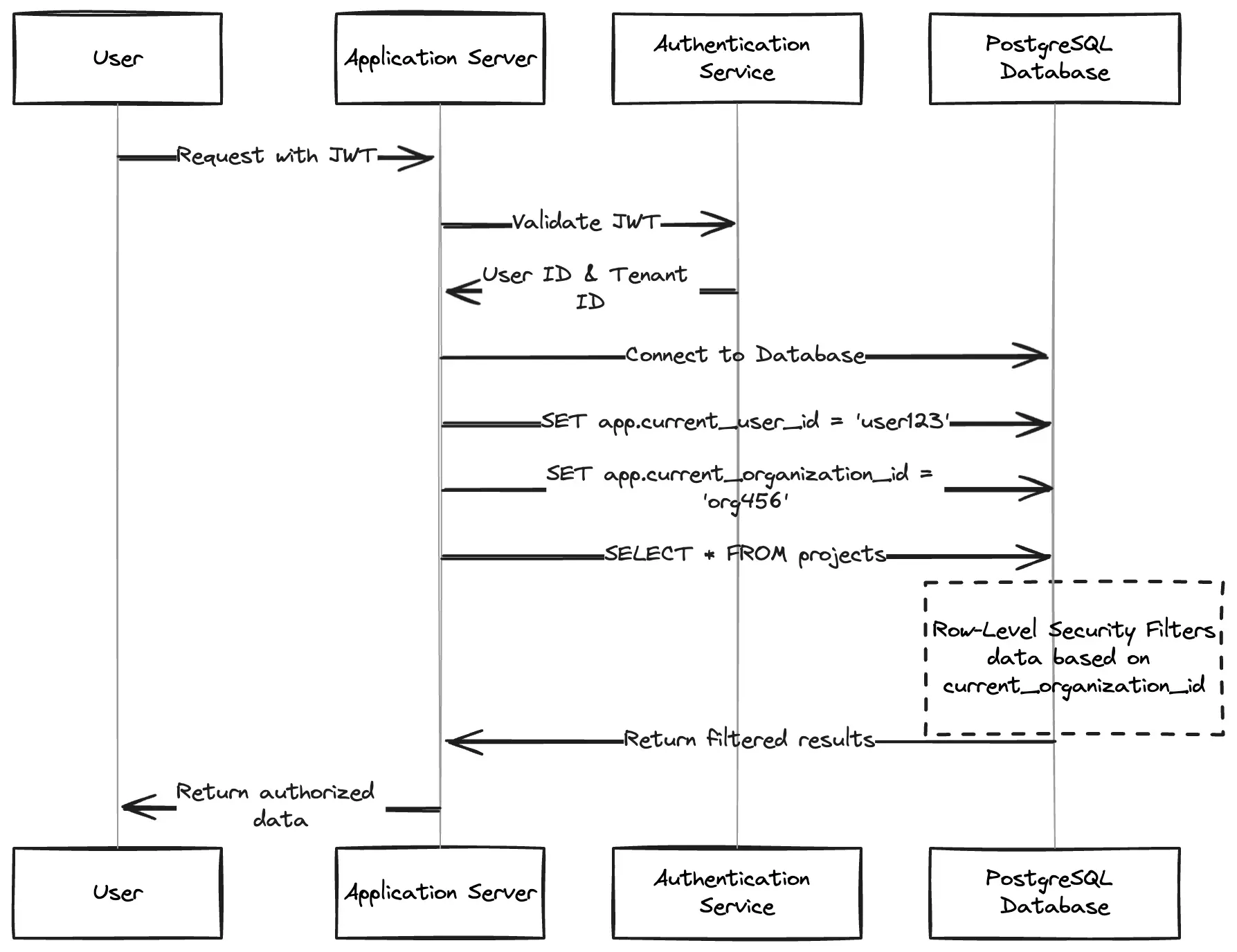
Setting Context in a Node.js Application
Here’s how you might integrate this in a Node.js application using node-postgres:
const { Pool } = require('pg');const pool = new Pool({
  connectionString: process.env.DATABASE_URL,});// Middleware to set database security contextasync function setDbContext(req, res, next) {
  // Get user ID and organization ID from session or JWT  const userId = req.user.id;  const organizationId = req.params.organizationId || req.user.defaultOrganizationId;  // Store a client connection for this request  req.dbClient = await pool.connect();  try {
    // Set the security context    await req.dbClient.query('SELECT set_current_user_id($1)', [userId]);    await req.dbClient.query('SELECT set_current_organization_id($1)', [organizationId]);    next();  } catch (error) {
    req.dbClient.release();    next(error);  }
  // Release the client when the response is sent  res.on('finish', () => {
    if (req.dbClient) {
      req.dbClient.release();    }
  });}
// Example route that uses the context middlewareapp.get('/api/organizations/:organizationId/projects',
  authenticate, // Your auth middleware  setDbContext,  async (req, res) => {
    try {
      // Thanks to RLS, this query will only return projects from the current organization      const result = await req.dbClient.query('SELECT * FROM projects ORDER BY created_at DESC');      res.json(result.rows);    } catch (error) {
      console.error('Error fetching projects:', error);      res.status(500).json({ error: 'Internal server error' });    }
});
Testing Your Permission System
Before going to production, thoroughly test your permission system:
Creating Test Data
-- Create test organizationsINSERT INTO organizations (id, name) VALUES
    ('11111111-1111-1111-1111-111111111111', 'Acme Corp'),
    ('22222222-2222-2222-2222-222222222222', 'Globex Inc.');
-- Create test usersINSERT INTO users (id, email, full_name) VALUES    ('aaaaaaaa-aaaa-aaaa-aaaa-aaaaaaaaaaaa', 'alice@example.com', 'Alice Adams'),
    ('bbbbbbbb-bbbb-bbbb-bbbb-bbbbbbbbbbbb', 'bob@example.com', 'Bob Brown'),
    ('cccccccc-cccc-cccc-cccc-cccccccccccc', 'carol@example.com', 'Carol Chen');
-- Add users to organizations with rolesINSERT INTO org_members (organization_id, user_id, role) VALUES    ('11111111-1111-1111-1111-111111111111', 'aaaaaaaa-aaaa-aaaa-aaaa-aaaaaaaaaaaa', 'admin'),
    ('11111111-1111-1111-1111-111111111111', 'bbbbbbbb-bbbb-bbbb-bbbb-bbbbbbbbbbbb', 'member'),
    ('22222222-2222-2222-2222-222222222222', 'cccccccc-cccc-cccc-cccc-cccccccccccc', 'admin');
-- Add test projectsINSERT INTO projects (id, organization_id, name) VALUES    ('abcd1234-abcd-abcd-abcd-abcd12345678', '11111111-1111-1111-1111-111111111111', 'Website Redesign'),
    ('efgh5678-efgh-efgh-efgh-efgh87654321', '22222222-2222-2222-2222-222222222222', 'Mobile App Launch');
Testing Tenant Isolation
-- Test as Alice (admin in Acme Corp)SELECT set_current_user_id('aaaaaaaa-aaaa-aaaa-aaaa-aaaaaaaaaaaa');
SELECT set_current_organization_id('11111111-1111-1111-1111-111111111111');
SELECT * FROM projects; -- Should only see Acme Corp projects-- Test as Carol (admin in Globex Inc)SELECT set_current_user_id('cccccccc-cccc-cccc-cccc-cccccccccccc');
SELECT set_current_organization_id('22222222-2222-2222-2222-222222222222');
SELECT * FROM projects; -- Should only see Globex Inc projects
Testing Role-Based Permissions
-- Test as Bob (member in Acme Corp)SELECT set_current_user_id('bbbbbbbb-bbbb-bbbb-bbbb-bbbbbbbbbbbb');
SELECT set_current_organization_id('11111111-1111-1111-1111-111111111111');
-- Should succeed (members can view projects)SELECT * FROM projects;
-- Should succeed (members can insert projects)INSERT INTO projects (organization_id, name)
VALUES ('11111111-1111-1111-1111-111111111111', 'Bob''s Project');
-- Should fail (only admins can delete projects)DELETE FROM projects WHERE name = 'Bob''s Project';
Best Practices and Pitfalls
Security Best Practices
- Apply the principle of least privilege: Grant only the minimum necessary permissions
- Set secure defaults: Start with restrictive policies and add permissions as needed
- Validate inputs: Don’t trust client-provided organization IDs
- Implement connection pooling carefully: Ensure connection pools don’t mix security contexts
- Create audit logs: Track permission changes and access attempts
Common Pitfalls
- Forgetting to enable RLS: Tables without RLS enabled don’t enforce policies
- Missing tenant ID columns: Ensure all tables have proper tenant ID relationships
- Leaking session context: Reset context variables between requests
- Query performance degradation: Monitor and optimize RLS policy performance
- Escalation through functions: Be careful with
SECURITY DEFINER functions
Conclusion
PostgreSQL offers powerful tools for implementing fine-grained permissions in multi-tenant applications. By combining roles, grants, and Row-Level Security with custom functions and policies, you can create a comprehensive permission system that ensures proper data isolation and access control.
Integrating with a dedicated authorization solution like Permit.io can provide additional capabilities such as attribute-based access control, visual policy management, and comprehensive audit logging for even more sophisticated authorization needs.
Further Reading
Ready to enhance your PostgreSQL permission system with more advanced features? Get started with Permit.io or join our community to discuss authorization strategies with other developers.