How to Create an Authorization Middleware for Fastify
Learn how to implement middleware for a granular access control system in Fastify applications using the Permit.io cloud service.

- Share:

Loading
3366 Members
 Join Permit's Slack
Fastify has gained popularity among developers as a Node.js API/web framework due to its reputation for being fast, modular, scalable, and well-structured. It is also compatible with modern architectures such as microservices and serverless. Its optimized performance for these architectures has made it a preferred choice for many developers.
One of the benefits of using Fastify is the plugin system which allows you to easily add functionality to your API routes. This allows you to maintain the ‘separation of concerns’ principle, which prevents the mixing of plugin functionality with the business logic of your application. Thus, you can seamlessly add authentication, error handling, billing, and more services to your application using plugins.
One of the critical aspects of any modern application is authorization. No one wants their application’s users to be able to read data that does not belong to them or perform operations they are not allowed to. This requires a granular access control system that checks what users can do and enforces it.
When it comes to authorization, many applications mix the permissions logic with the application logic, which is not a good idea. When these two logic sets are combined, they inevitably grow and become increasingly complex, turning any future effort of separating, editing, updating, or upgrading them into a nightmare. Authorization, the same as authentication, requires to be managed separately from our application logic.
This guide demonstrates a middleware plugin which helps you implement a granular access control system into Fastify applications. We will use Permit.io’s cloud service to configure the proper permissions model, and then demonstrate how it can be seamlessly added to any kind of Fastify application. This will allow a proper enforcement model for your application users.
To demonstrate the Permit.io service and its Fastify plugin for authorization, we created a demo blogging platform with the relevant Fastify APIs. See the code below:
require('dotenv').config();

import Fastify from 'fastify';
import type { FastifyInstance, FastifyReply, FastifyRequest } from "fastify";

// Create server
const server: FastifyInstance = Fastify({ logger: true });

// Mock handlers
const mockPublic = async (_req: FastifyRequest, _reply: FastifyReply) => ({ hello: 'public' });
const mockPrivate = async (_req: FastifyRequest, _reply: FastifyReply) => ({ hello: 'private' });
const authenticate = async () => ({ hello: 'authenticate' });

// Scoped private routes
const privateRoutes = async (fastify: FastifyInstance, _opts: any) => {
    // Mock authentication
    fastify.register(authenticate);

    fastify.post('/post', mockPrivate);
    fastify.put('/post', mockPrivate);
    fastify.delete('/post', mockPrivate);
    fastify.post('/comment', mockPrivate);
    fastify.put('/comment', mockPrivate);
    fastify.delete('/comment', mockPrivate);
    fastify.post('/author', mockPrivate);
    fastify.put('/author', mockPrivate);
    fastify.delete('/author', mockPrivate);
};

// Scoped public routes
const publicRoutes = async (fastify: FastifyInstance, _opts: any) => {
    fastify.get('/post', mockPublic);
    fastify.get('/comment', mockPublic);
    fastify.get('/author', mockPublic);
}

// Register scoped routes
server.register(privateRoutes);
server.register(publicRoutes);

// Start server
(async () => {
    try { await server.listen({ port: 3000 }); } catch (err) {
        server.log.error(err);
        process.exit(1);
    }
})();
For the purpose of this demo, we have implemented a mock authentication plugin (registered as a mock function in the code).
We separated routes into public and private ones and protected the private ones with the mock Authentication plugin. Permit.io works with every authentication method - so you can integrate it with any authentication method you prefer.
To follow this tutorial, we are recommending cloning the source code to your local machine, and run npm i && npm run dev so you can see it in action running on your local environment at port 3000.
You can clone it from here (remove the branch to get the final version of the tutorial).
git clone -b tutorial git@github.com:permitio/permit-fastify-example.git
When incorporating permissions into an application, it's important to design the model and be aware of which permissions should or should not be granted to users. To do this, we need to consider three entities: Who the user is (Their Identity and Role), What Resources are we monitoring access for, and which Actions can be preformed on that resource. The combination of these entities is called a Policy.
With those entities in mind, we can map our application into conditions and policies to reflect the permissions we want.
Let’s examine our demo blog’s APIs.
Roles can be assigned to authenticated users (Admin, Writer, Commenter).
Actions can be paired (to simplify the process) with HTTP methods (Get, Create, Update, Delete, Patch).
Resources are the different endpoints we want to manage access for (posts, authors, comments, etc.)
By mapping them all, we can get the following table:
| Role | Resource | Action |
| Admin Writer Commenter |
Post Author Comment |
Get Create Update Delete Patch |
Now that we have our basic outline of our roles, resources and actions, we can map the desired allowed conditions (Following the least privilege principle) of the model as follows:
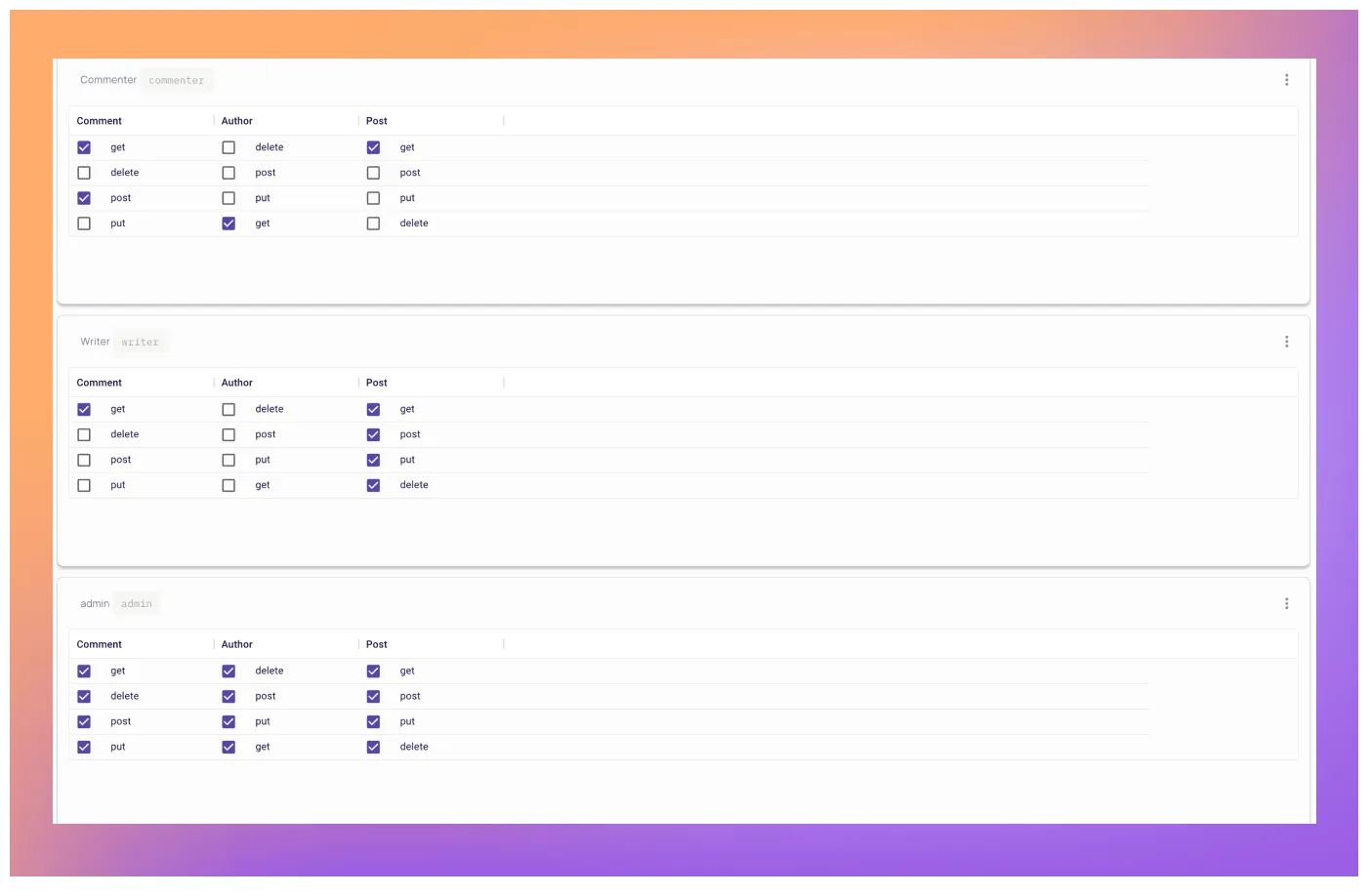
Admins can perform any actions on any resource
Writers can create, update, patch, and delete posts, and get comments
Commenters can get and create comments
Now that we have our model designed, let’s implement it! As we previously mentioned, we do not intent to incorporate the policy code as part of the API logic. To keep
things clean, we want a separate service that allows us to define and configure the policies. This way, the service can focus on enforcing permissions, while the application code focuses on vital application logic.
Permit.io is an authorization-as-a-service product that lets us configure and enforce permissions, keeping your code clean and controlling your application access. The tool has an extensive free tier, and is completely self service.
To configure the desired application permissions, let’s follow these steps:
Log in to Permit.io at app.permit.io
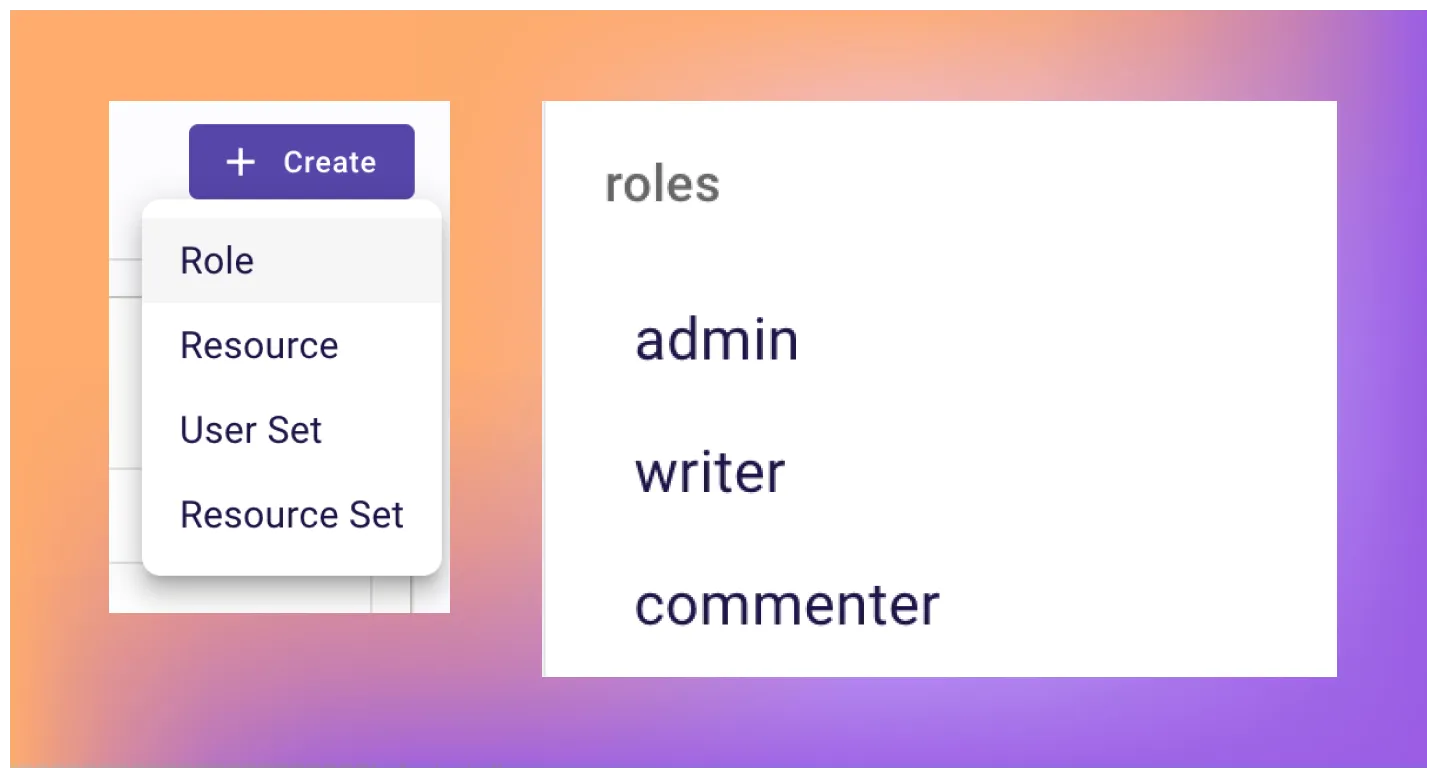
After logging in, go to the Policy page and create the following roles:
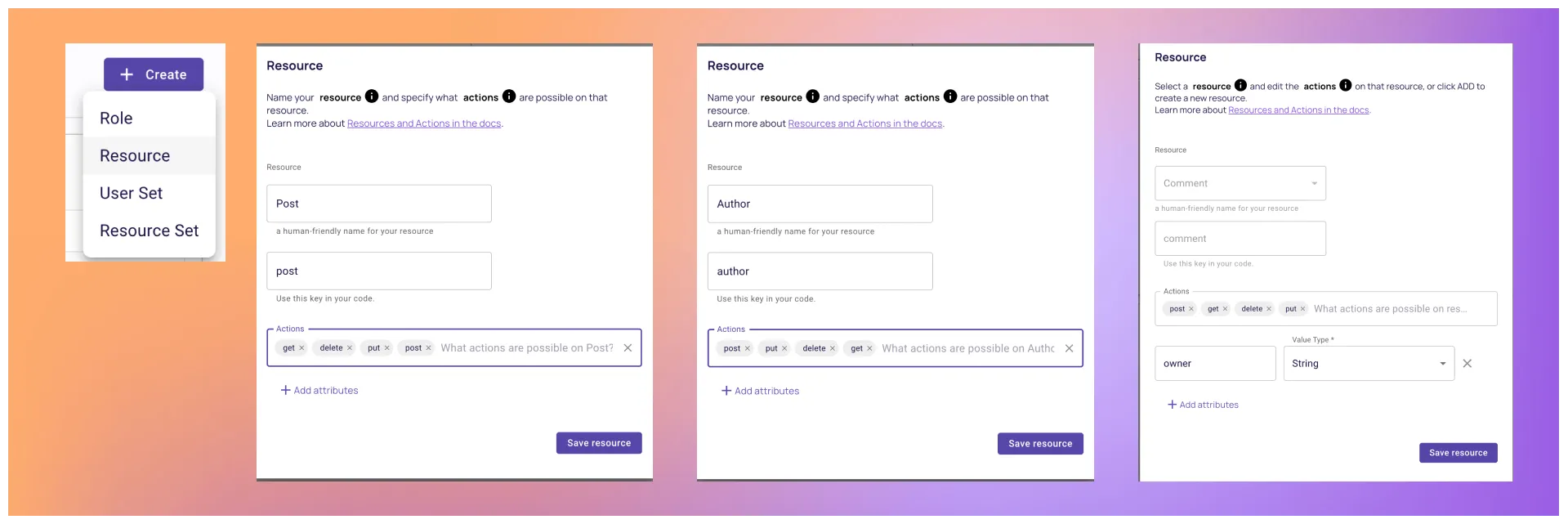
Continue by creating the resources with their actions:
Implement the desired conditions to the policy table by checking the relevant boxes.
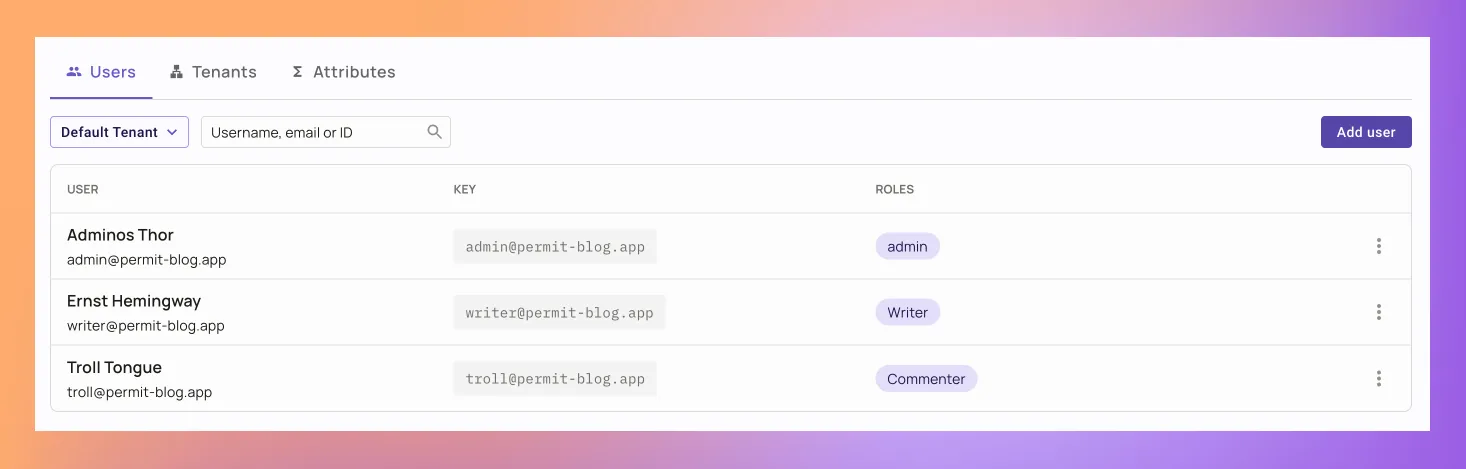
We will finish the configuration by creating three users and assign them the relevant roles in the Users screen.
That’s it! Now that we set up our permissions, its time to connect them to our Fastify application.
To enforce the policy in our application, let’s do the following:
Grab the SDK code for Permit.io’s APIs from the application:
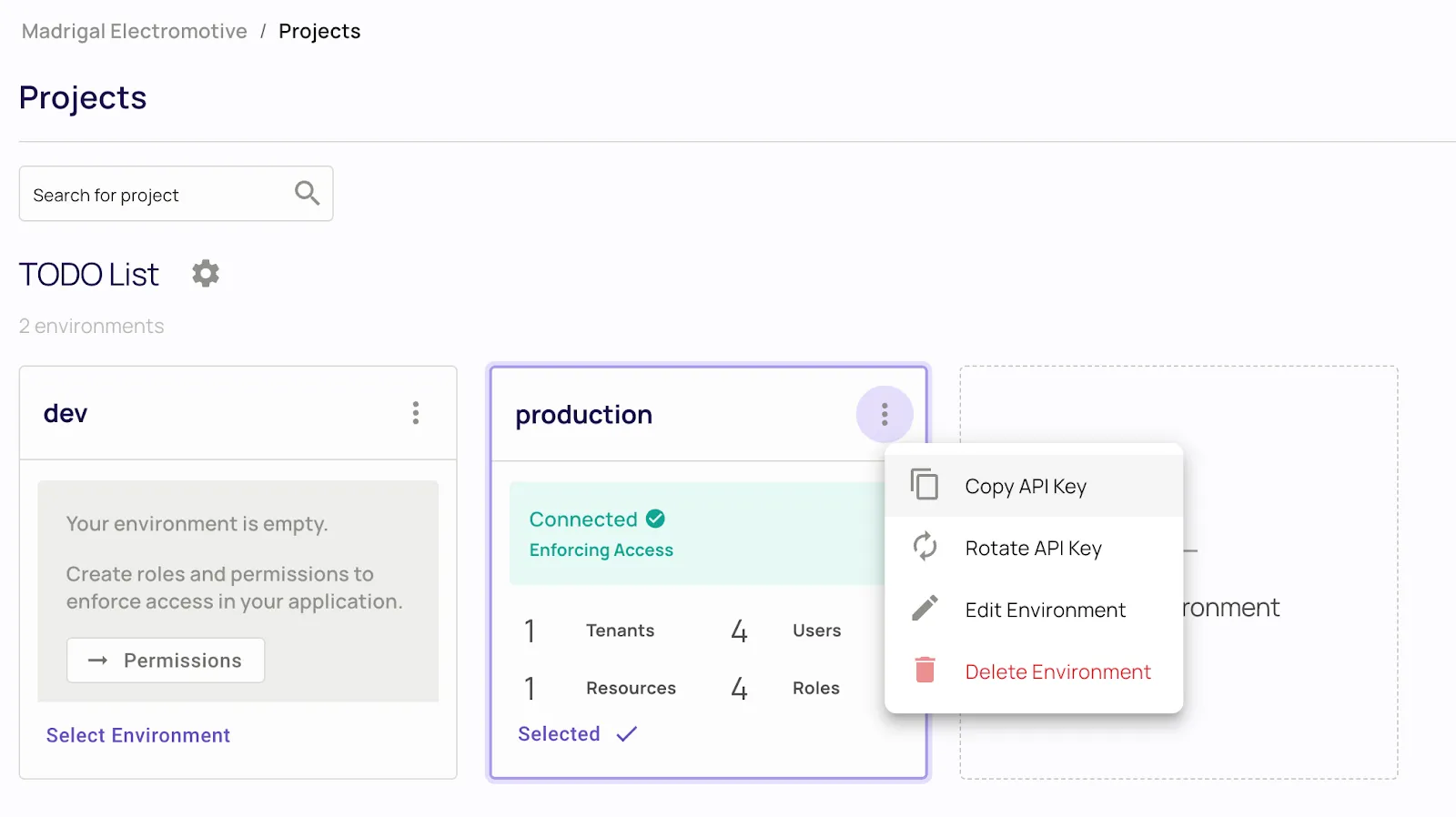
Paste it in your .env file in the following format.
PERMIT_SDK_TOKEN=<permit_sdk_token>
Let’s now create a new plugin file. If you cloned our project, you can find the authorize.ts file in the plugin folder. If you are using your own project, do it in your desired plugin folder.
In the file we created, paste the following code. Look at this commented code, you’ll find a granular middleware that checks the permissions of the API requests by the request configuration.
import type { FastifyReply, FastifyRequest, HookHandlerDoneFunction } from 'fastify';
import { Permit } from 'permitio';

// Initialize Permit SDK with token from the .env file
const permit = new Permit({
  token: process.env.PERMIT_SDK_TOKEN,
  pdp: 'https://cloudpdp.api.permit.io'
});

export const withPermitMiddleware = async (req: FastifyRequest, reply: FastifyReply, done: HookHandlerDoneFunction) => {
  const { headers: { user = '' }, body: attributes, routerPath, method: action } = req;

  // Take user from the header, in a real world scenario this would be a JWT token
  const identity = (Array.isArray(user) ? user[0] : user);

  // Split the path to get the resource type
  const type = routerPath.split('/')[1]

  // Build the resource object. If the request body is empty, we only need the type
  const resource = attributes ? { type, attributes } : type;

  // Check if the user is allowed to perform the action on the resource
  const allowed = await permit.check(identity, action.toLowerCase(), resource);

  // If the user is not allowed, return a 403
  if (!allowed) {
    reply.code(403).send({ error: 'Forbidden' });
  }
};
Now that we have the generic middleware, we only have to paste the following code at the top of the private routes registry, just after the authentication plugin register.
import { withPermitMiddleware } from './plugins/authorize';
...
// Add authorization middleware
fastify.addHook('preHandler', withPermitMiddleware);
...
Looking at the code, we can see the options object where we streamlined the auth header as the identity key, the URL to the resource name, and the action method. At this point, we have access control protection with Permit.io Fastify middleware. Let’s run our project with npm run dev and send a creating an author request with a writer user. This should result in the following error:
Sorry, your browser doesn't support embedded videos.
Note: Enforcing ABAC policies requires deploying a local PDP - to get started, follow this guide. In a real world scenario, it can be challenging to streamline our Identity, Resource, and Action to a flat list of Roles, Resource types, and Action names, as we did in our example.
If, for example, we would like to have approval flow for content in our blog, and only allow approved writers to publish articles, disallow comments from a specific geolocation, or any other more granular limitations, simple RBAC will not suffice.
Managing more granular permissions such as these require handling attributes, which can be achieved through Attribute-Based access control (ABAC).
Let’s write the conditions we list above, but with more details on the attributes.
Admin users can perform any action on any resource.
Writers can edit, and delete posts but create only unpublished posts.
Approved writers can create any kind of post.
Commenters can create comments.
Adding attributes to an RABC model, thus essentially switching to ABAC is quite a complex task. Permit.io helps you to alleviate this complexity, as we can simply change our configuration to support the new permission model without any changes in the application code. A typical way to implement ABAC is using Resource Sets and User Sets—these sets are built from conditions that combine user and resource attributes. Let’s see how we can utilize these and configure these policies within Permit.
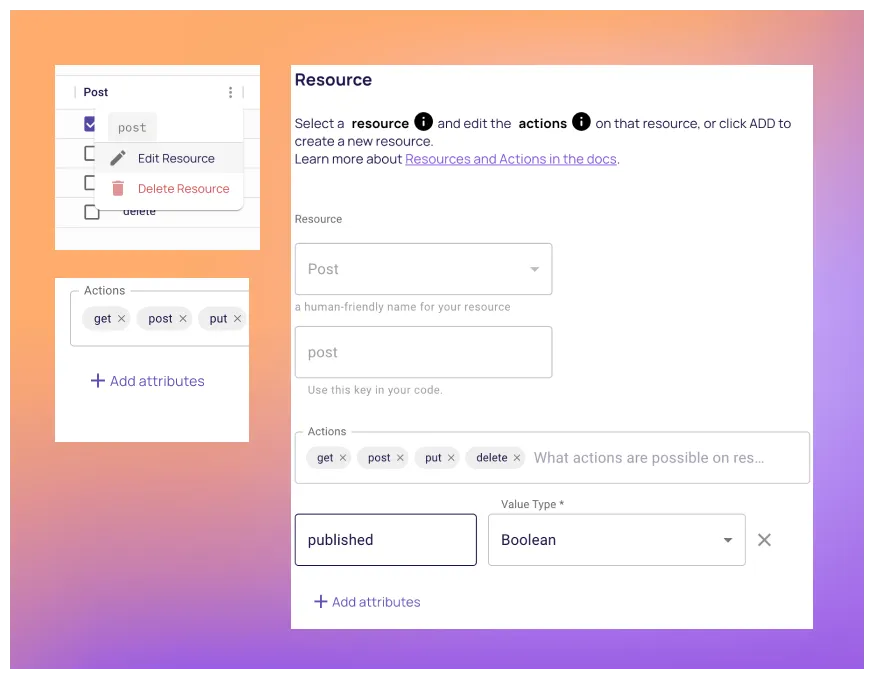
We start by configuring the attributes on the following resources. You can do this by clicking the three dots on the resource table in the Policy Editor and then Add Attribute
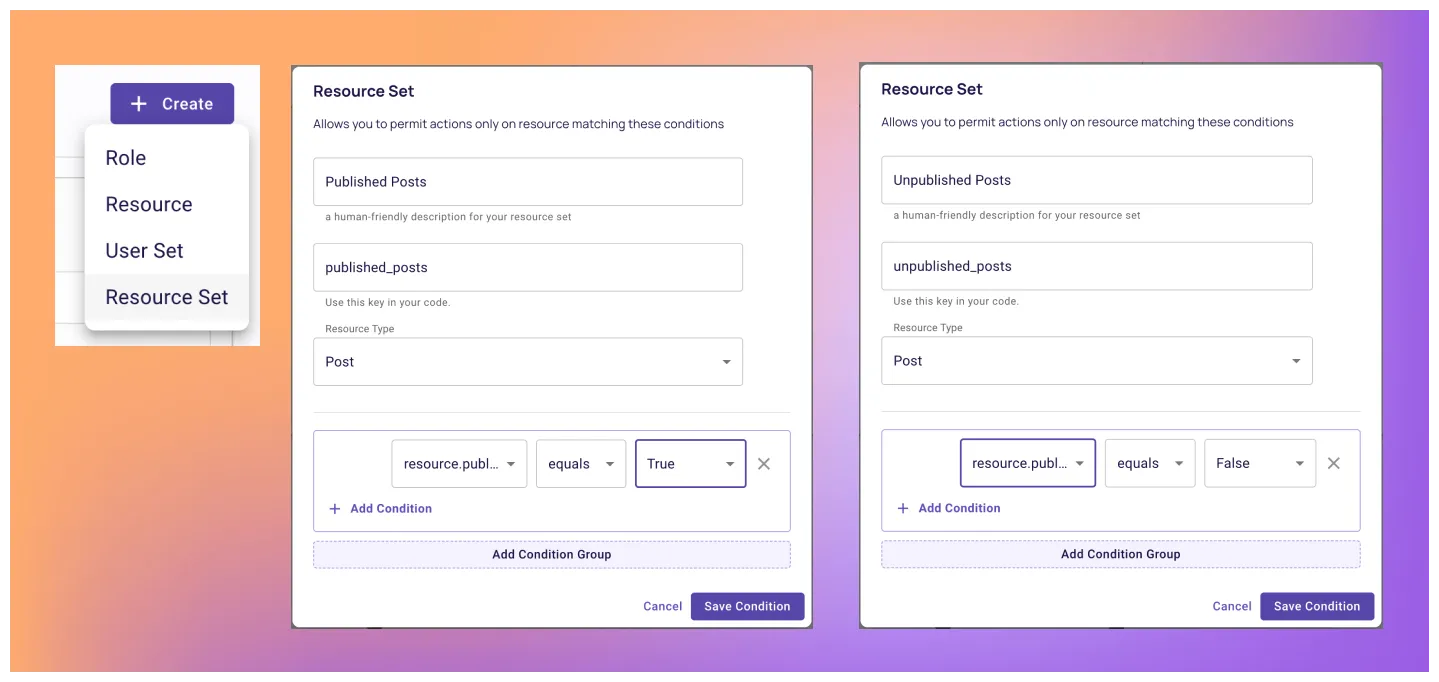
Now that Permit.io is aware of our resource attributes, let’s create the conditions by creating Resource Sets in the Policy Editor.
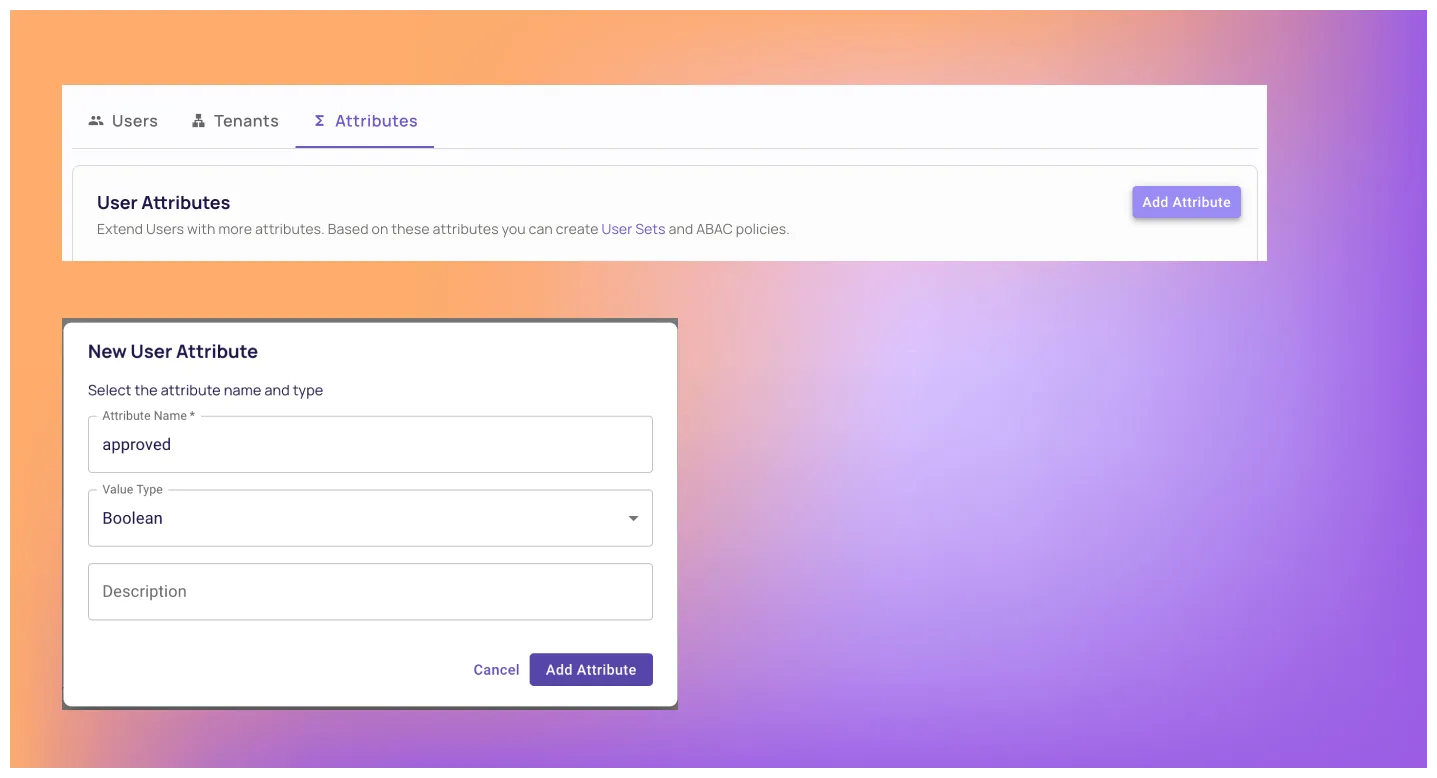
To match the policy with user attributes, we need to configure user attributes as well. This can be done from the Users screen by clicking the Attributes tab and creating an approved attribute.
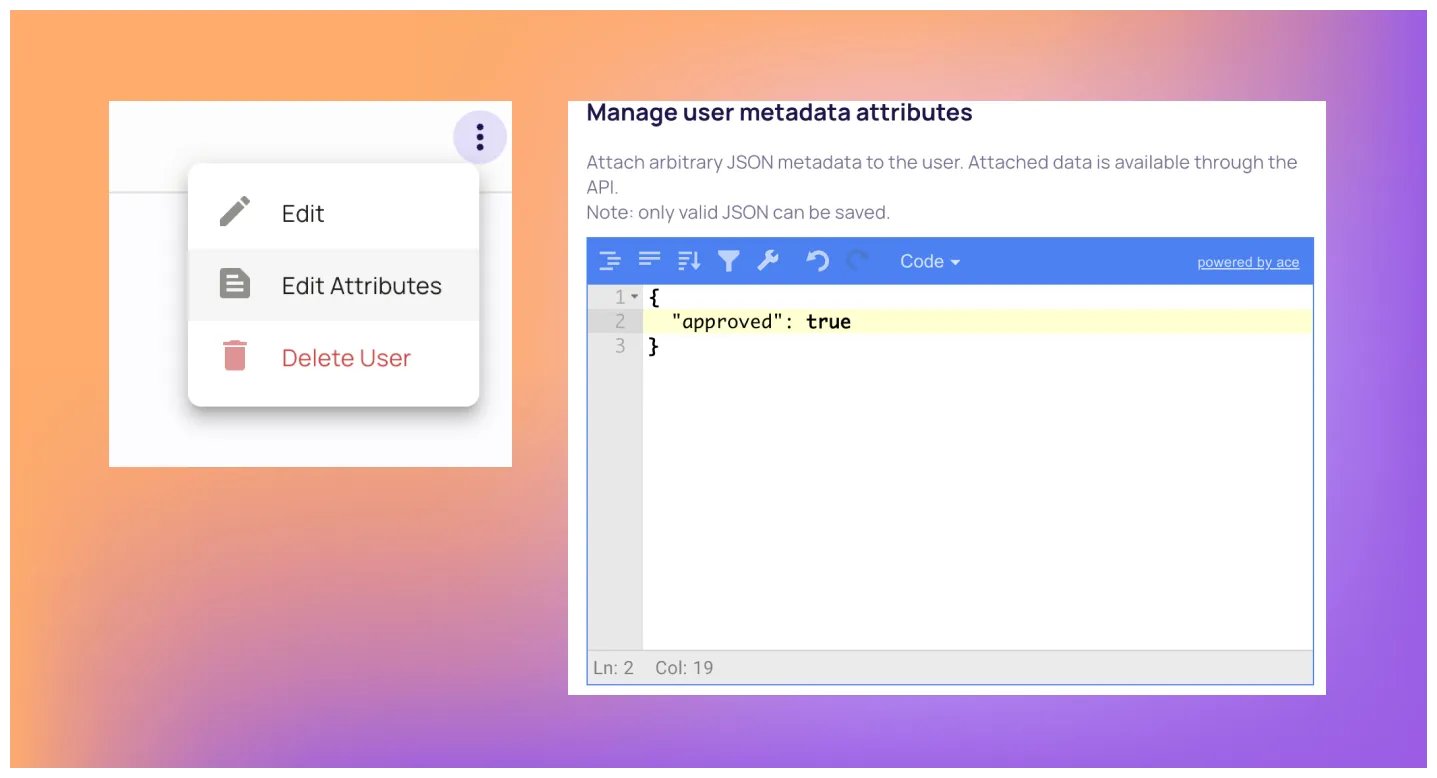
Let’s also add a new user in the Writer role that has the approved attribute in their profile. This will help us to check the ABAC policy later. To do so, just add a Writer role user, and then assign them the following attributes.
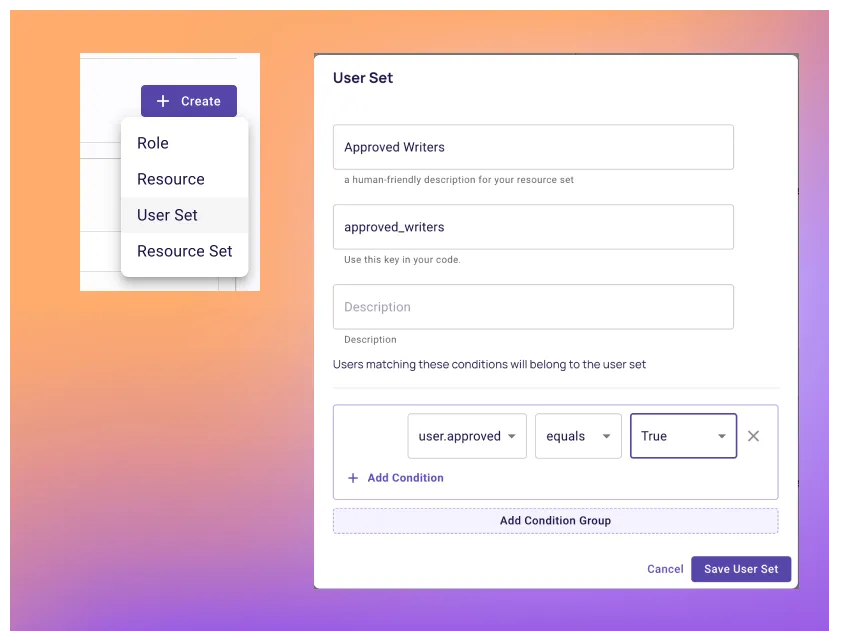
Now that Permit.io is aware of our custom user attributes, let’s create the conditions by creating User Sets in the Policy Editor.
You can now see new options in the policy table - let’s adopt the policy configuration to our newly defined conditions.
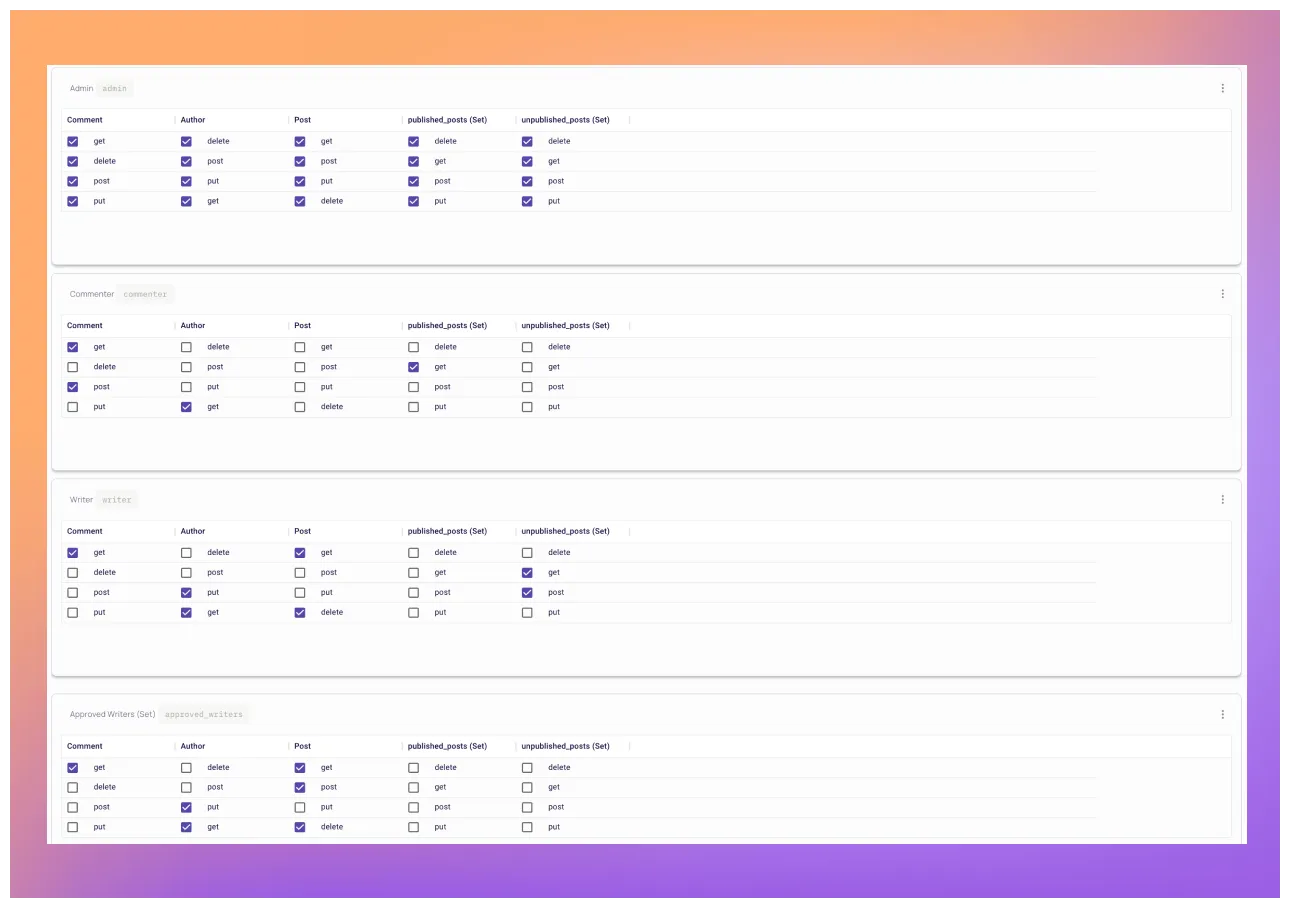
Instead of rewriting our application code, the same middleware we created for our private routes will continue to enforce permissions with the new policy model configuration we assigned.
Sorry, your browser doesn't support embedded videos.
At this point, you should have a basic understanding of how to implement a basic authorization model into your Fastify application, enforcing permissions with single line of code.
The next step would be to analyse the particular needs of your application, and implement a reliable permission model into it. As you saw in the article - it shouldn’t be very complicated.
The plugin we created for this blog is available and ready to use - Just adapt it to your application’s factors in the relevant request fields, and your done.
If your organization already implemented an authorization model, and you want to learn more about how to scale it right, Join our Slack community where hundreds of devs and authorization experts discuss building and implementing authorization.

Full-Stack Software Technical Leader | Security, JavaScript, DevRel, OPA | Writer and Public Speaker